Documentation Index

Fetch the complete documentation index at: https://docs.anyway.sh/llms.txt

Use this file to discover all available pages before exploring further.

Anyway SuperAPI is a pay-per-call API gateway that gives you access to 60+ endpoints through a single interface using the x402 payment protocol. Pay with USDC on Base — no API keys, no subscriptions.

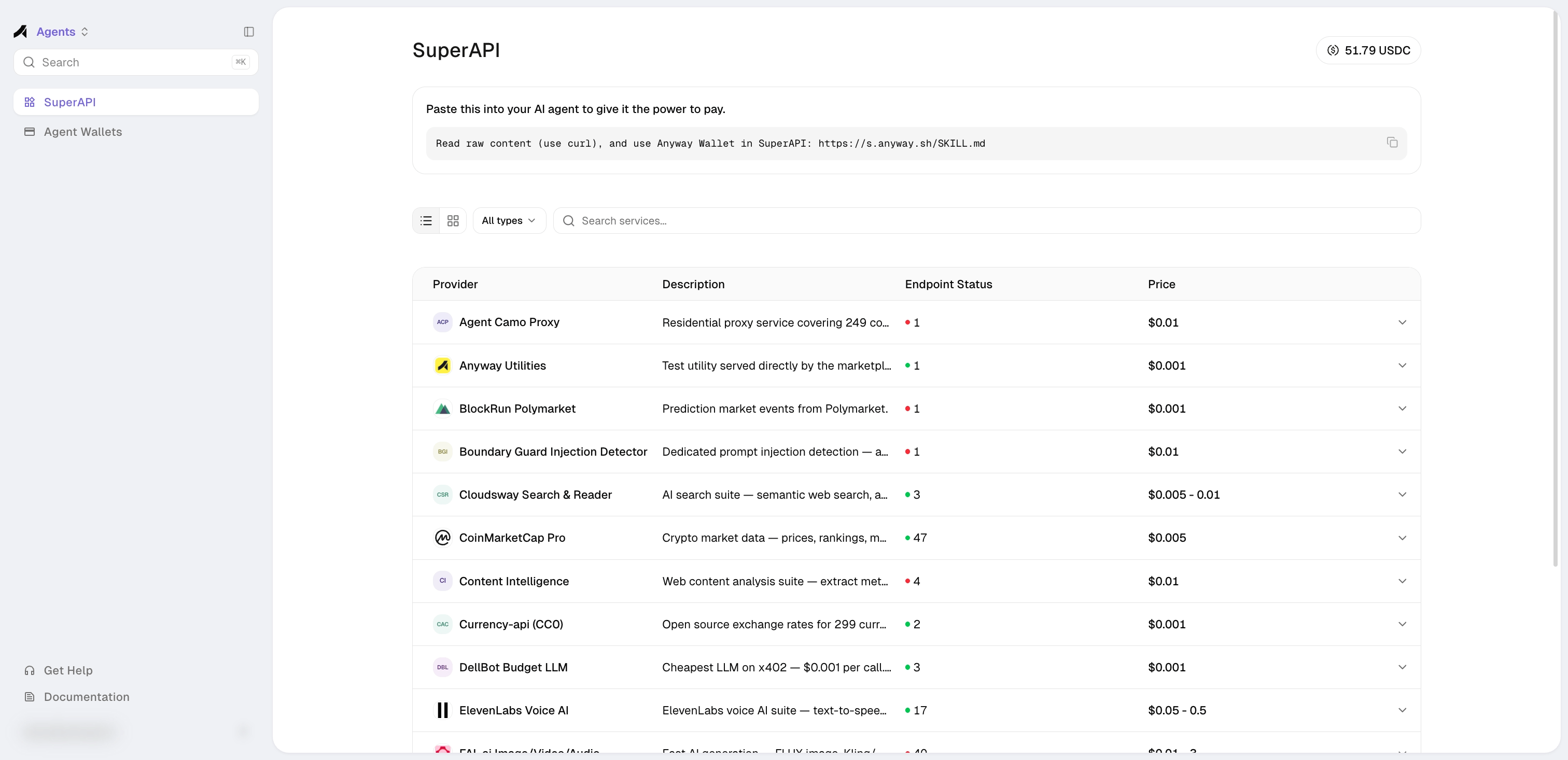
Browse the SuperAPI

Explore available APIs, check health status, and get code examples.
SuperAPI page showing available APIs with health status and pricing

Quick Start

1. Discover available APIs

Always call the discovery and info endpoints before making any API call. Skipping this is the #1 cause of errors (wrong service ID, wrong method, wrong params, wrong path).
Step A — Find the service. Browse all available APIs:
curl https://marketplace-prod.anyway.sh/v1/api/directory/llm
Each entry includes id (use this in URLs, not name), info_url, and endpoints[].url (full callable URL). Common service IDs: stableenrich (search), twit-sh (Twitter/X), coinmarketcap (crypto), robtex (DNS), tx402 (LLM). Step B — Get endpoint details. Fetch the info page for the service you want:
curl https://marketplace-prod.anyway.sh/v1/api/info/{service_id}
The response includes the correct HTTP method, parameter names, notes (gotchas), and a copy-paste ready curl_x402 command per endpoint. The info response also includes a complete example_code (Python) that you can run directly.

2. Make a paid API call

You need a wallet to pay for API calls. If you don’t have one yet, create an Agent Wallet first.
Start from the code examples in this document, then modify. Copy the code below as your starting point and change the URL/parameters — don’t construct requests from scratch or guess parameter names yourself.
If your agent uses an Agent Wallet (P-256 key):
import crypto from "crypto";

const BASE = "https://marketplace-prod.anyway.sh";
// ── Parse Agent Wallet Key ────────────────────────────────
const key = JSON.parse(
  Buffer.from(process.env.ANYWAY_AGENT_WALLET_KEY, "base64").toString()
);

// ── Auth helpers ─────────────────────────────────────────

const privateKey = crypto.createPrivateKey({
  key: Buffer.from(key.privateKey, "base64"), type: "pkcs8", format: "der",
});
const pubkey = crypto.createPublicKey(privateKey)
  .export({ type: "spki", format: "der" }).toString("base64");

const sign = (data) => crypto.sign("sha256", Buffer.from(data),
  { key: privateKey, dsaEncoding: "der" }).toString("base64");

// Agent API auth: P-256 sig over "METHOD\nPATH\nTIMESTAMP"
function authHeaders(method, path) {
  const ts = String(Math.floor(Date.now() / 1000));
  return {
    "Content-Type": "application/json",
    "X-Agent-Pubkey": pubkey,
    "X-Agent-Timestamp": ts,
    "X-Agent-Signature": sign(`${method}\n${path}\n${ts}`),
  };
}

// ⚠️ Privy auth sig MUST be JCS-canonicalized (sorted keys), not JSON.stringify
function jcs(v) {
  if (v === null || typeof v !== "object") return JSON.stringify(v);
  if (Array.isArray(v)) return `[${v.map(jcs).join(",")}]`;
  return `{${Object.keys(v).sort().map(k => `${JSON.stringify(k)}:${jcs(v[k])}`).join(",")}}`;
}

// ── Payment flow ─────────────────────────────────────────

// 1. Get wallet info from API
const { data: wallet } = await (await fetch("https://app-prod.anyway.sh/v1/agent-wallet",
  { headers: authHeaders("GET", "/v1/agent-wallet") })).json();

// 2. Call SuperAPI endpoint → 402 challenge
//    GET endpoints  (e.g. twit-sh, robtex): params in URL query string
//    POST endpoints (e.g. stableenrich, tx402): params in JSON body
//    Always check /v1/api/info/{service_id} for the correct method.
const url = `${BASE}/v1/api/x402/twit-sh/tweets/search?words=bitcoin&count=5`;
const res = await fetch(url);
const challenge = JSON.parse(
  Buffer.from(res.headers.get("payment-required"), "base64").toString()
);
const accepted = challenge.accepts[0];

// 3. Build EIP-712 typed data from challenge
const typedData = {
  domain: {
    name: accepted.extra.name, version: accepted.extra.version,
    chainId: Number(accepted.network.split(":")[1]),
    verifyingContract: accepted.asset,
  },
  types: { // ⚠️ Must include BOTH EIP712Domain and TransferWithAuthorization
    EIP712Domain: [
      { name: "name", type: "string" }, { name: "version", type: "string" },
      { name: "chainId", type: "uint256" }, { name: "verifyingContract", type: "address" },
    ],
    TransferWithAuthorization: [
      { name: "from", type: "address" }, { name: "to", type: "address" },
      { name: "value", type: "uint256" }, { name: "validAfter", type: "uint256" },
      { name: "validBefore", type: "uint256" }, { name: "nonce", type: "bytes32" },
    ],
  },
  primary_type: "TransferWithAuthorization", // ⚠️ must be snake_case
  message: {
    from: wallet.walletAddress, to: accepted.payTo, value: accepted.amount,
    validAfter: "0", validBefore: String(Math.floor(Date.now() / 1000) + 600),
    nonce: "0x" + crypto.randomBytes(32).toString("hex"),
  },
};

// 4. Sign via Anyway Wallet
//    - Privy auth sig = P-256 over JCS-canonicalized CAIP-222 payload
//    - Agent auth headers = P-256 over "POST\n/path\ntimestamp"
const privySig = sign(jcs({
  version: 1, method: "POST",
  url: `https://api.privy.io/v1/wallets/${wallet.providerWalletId}/rpc`, // ⚠️ exact path must be /rpc
  body: { method: "eth_signTypedData_v4", params: { typed_data: typedData } },
  headers: { "privy-app-id": wallet.appId },
}));
const signPath = "/v1/agent-wallet/sign-typed-data";
const { data: { signature } } = await (await fetch(`https://app-prod.anyway.sh${signPath}`, {
  method: "POST", headers: authHeaders("POST", signPath),
  body: JSON.stringify({ typed_data: typedData, signature: privySig }),
})).json();

// 5. Retry with PAYMENT-SIGNATURE → get result
const settled = await fetch(url, {
  headers: {
    "PAYMENT-SIGNATURE": Buffer.from(JSON.stringify({
      x402Version: 2, scheme: accepted.scheme, network: accepted.network,
      accepted, payload: { signature, authorization: typedData.message },
    })).toString("base64"),
  },
});
console.log(await settled.json());
Key points — copy the code above exactly:
  • Field name is primary_type (snake_case)
  • types includes both EIP712Domain and TransferWithAuthorization
  • Privy auth sig URL path is /rpc
  • Privy auth sig payload must be JCS-canonicalized (sorted keys) before signing
Both examples above use GET (twit-sh). For POST endpoints (e.g. stableenrich), pass params in a JSON body instead and add method: "POST" to the fetch call. Always check /v1/api/info/{service_id} for the correct method per endpoint.

Available APIs

Pay-per-call with USDC on Base:
CategoryServicesFrom
AItx402 (LLM chat), MiniMax (chat/TTS/video/image/music), Z-AI (chat/image/video), PQS prompt scoring, DellBot, OBAgents$0.001
SearchStableEnrich (8-in-1: Exa, Serper, Firecrawl, Apollo, etc.), Scout HN/NPM, Content Intel, UtilsForAgents$0.005
CryptoCoinMarketCap, Nansen, DefiLlama, Zapper, PrintMoneyLab (KR prices/kimchi premium), multi-chain gas$0.001
Socialtwit.sh (Twitter/X)$0.01
PredictionPolymarket, Manifold, BlockRun$0.001
FinanceFrankfurter FX, Currency-api, VATComply, GlobalEcon$0.001
NetworkRobtex DNS, WHOIS$0.001
BrowserAgent Camo proxy, Screenshot$0.002
OtherStableTravel (flights/airports), ReloadPi (eSIMs/vouchers/topups), Toulaw (legal search), Boundary Guard (injection detection), StableUpload, Wurk (crowdsource)$0.001
Run curl https://marketplace-prod.anyway.sh/v1/api/directory/llm for a compact listing with info_url per service, or curl https://marketplace-prod.anyway.sh/v1/api/directory for the full list with health status.

How It Works

You → SuperAPI → Payment (USDC on Base) → API Response
1

Send request

Call the SuperAPI endpoint with your API request. No auth headers needed.
2

Receive payment challenge

SuperAPI returns HTTP 402 with a PAYMENT-REQUIRED header containing the price and payment details. The response also includes an X-Api-Info-Url header pointing to the endpoint’s documentation.
3

Sign and pay

Sign an EIP-3009 transferWithAuthorization — either directly with your wallet key, or via the Anyway Wallet signing service.
4

Get results

Payment is verified and settled on-chain. The API result is returned.