> ## Documentation Index
> Fetch the complete documentation index at: https://docs.anyway.sh/llms.txt
> Use this file to discover all available pages before exploring further.
# Quickstart
> Pay APIs and get paid using Anyway Wallet — all from your local AI agent.
## Your AI Agent's Wallet
Anyway is the financial OS for AI agents. With Anyway wallet, your agent can:
Call any of 100+ paid APIs on SuperAPI and pay with USDC on Base under wallet limits.
Accept payments from anyone, in seconds, with Anyway Payment Link
This quickstart takes **\< 60 seconds** and **one browser trip**. Just paste a prompt into your local agent.
**Supported agents**
Claude Code · Cursor · Codex · OpenClaw · Hermes · or any agent that can read a URL.
***
## Choose your path
### Buy in 60 seconds
Goal: by the end of this section, your agent will have an Agent Wallet and have successfully called a paid Anyway API on your behalf.
Open your local agent and paste this prompt:
```
Read raw content (use curl), install and setup anyway: https://s.anyway.sh/SKILL.md
```
**Where to paste for Claude Code:** Paste directly into the chat.
```
Read raw content (use curl), install and setup anyway: https://s.anyway.sh/SKILL.md
```
**Where to paste for Cursor:** Paste into the chat, or save to `.cursor/rules/anyway.md` to make it persistent across sessions.
```
Read raw content (use curl), install and setup anyway: https://s.anyway.sh/SKILL.md
```
**Where to paste for Codex:** Paste into the chat.
```
Read raw content (use curl), install and setup anyway: https://s.anyway.sh/SKILL.md
```
**Where to paste for OpenClaw:** Paste into the chat.
```
Read raw content (use curl), install and setup anyway: https://s.anyway.sh/SKILL.md
```
**Where to paste for Hermes:** Paste into the system prompt or chat.
```
Read raw content (use curl), install and setup anyway: https://s.anyway.sh/SKILL.md
```
**Where to paste for Other:** Append the contents of skills/SKILL.md to your project's instructions so every future session starts with this capability.
**Your agent will say:**
```
🛒 Anyway SuperAPI — Pay-as-you-go APIs for your agent
Anyway is the payment layer for AI agents. I'll set up your Anyway
account + Agent Wallet so I can call paid APIs (Firecrawl, Serper,
Polygon, etc.) and pay with USDC on Base under your Agent Wallet limits.
This is a one-time setup (~60 seconds).
1. Open this link to sign up / log in:
👉 https://app.anyway.sh/cli-auth?callback_port=0
2. After signup, you'll see your Agent Token. Copy and paste it here.
⏳ Waiting for your token...
```
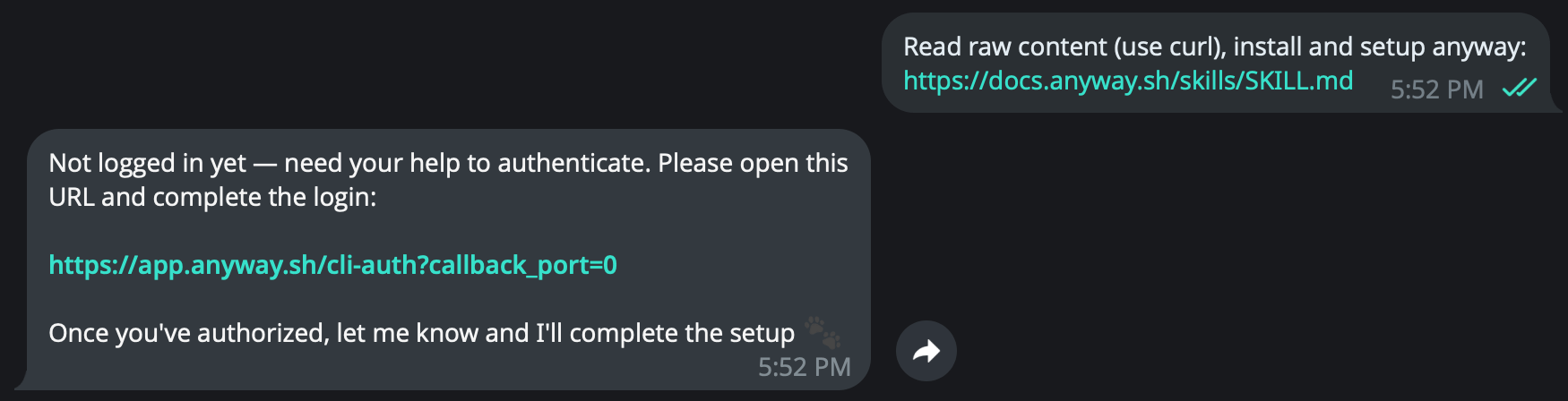 Click the link your agent gave you. You'll land on a single page that handles the sign-in authentication process automatically:
| Step | You do | Anyway does (in the background) |
| ---- | --------------------------- | ------------------------------------------------------ |
| 1 | Email OTP or Google sign-in | Creates your Anyway account |
| 2 | Tick "I agree" + reCAPTCHA | Records TOS consent for non-custodial wallet |
| 3 | *automatic* | Creates your **Main Wallet** (USDC on Base, Privy MPC) |
Click the link your agent gave you. You'll land on a single page that handles the sign-in authentication process automatically:
| Step | You do | Anyway does (in the background) |
| ---- | --------------------------- | ------------------------------------------------------ |
| 1 | Email OTP or Google sign-in | Creates your Anyway account |
| 2 | Tick "I agree" + reCAPTCHA | Records TOS consent for non-custodial wallet |
| 3 | *automatic* | Creates your **Main Wallet** (USDC on Base, Privy MPC) |
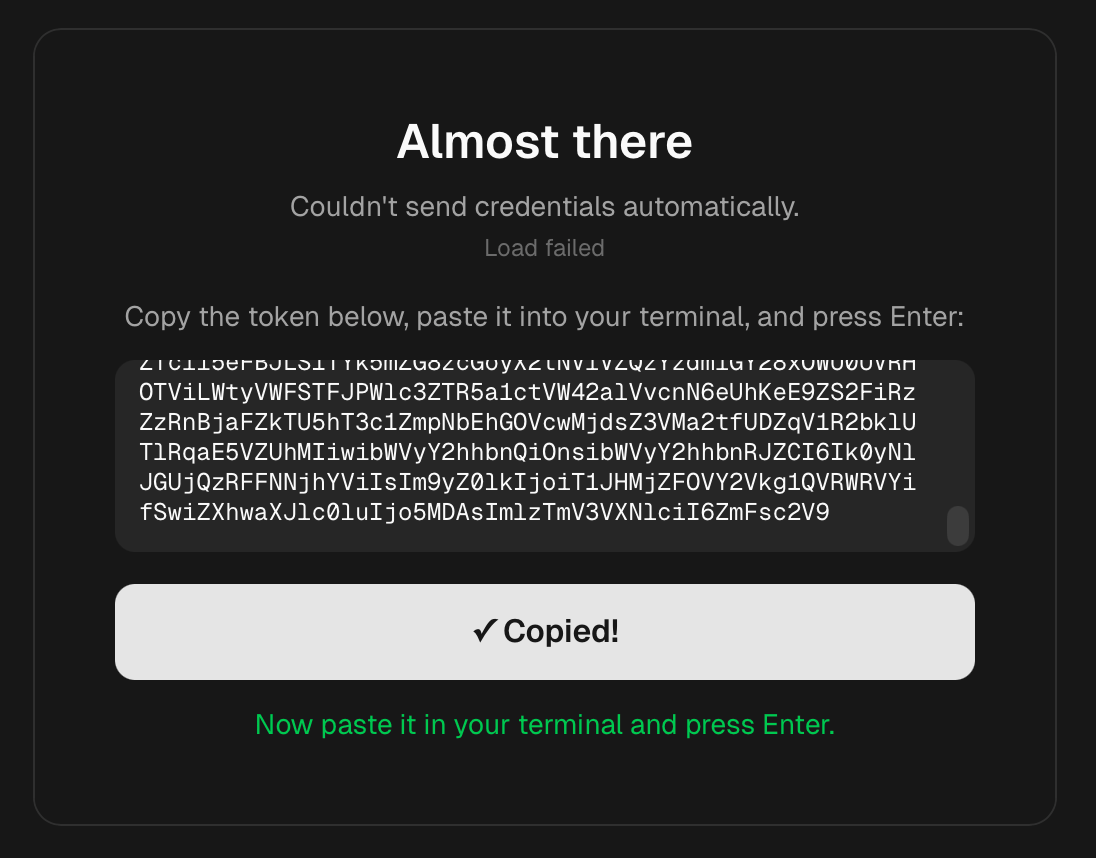 After signing in, follow the prompts on the GUI to spin up your agent's wallet securely.
1. Click **"Create Agent Wallet"** on your dashboard.
After signing in, follow the prompts on the GUI to spin up your agent's wallet securely.
1. Click **"Create Agent Wallet"** on your dashboard.
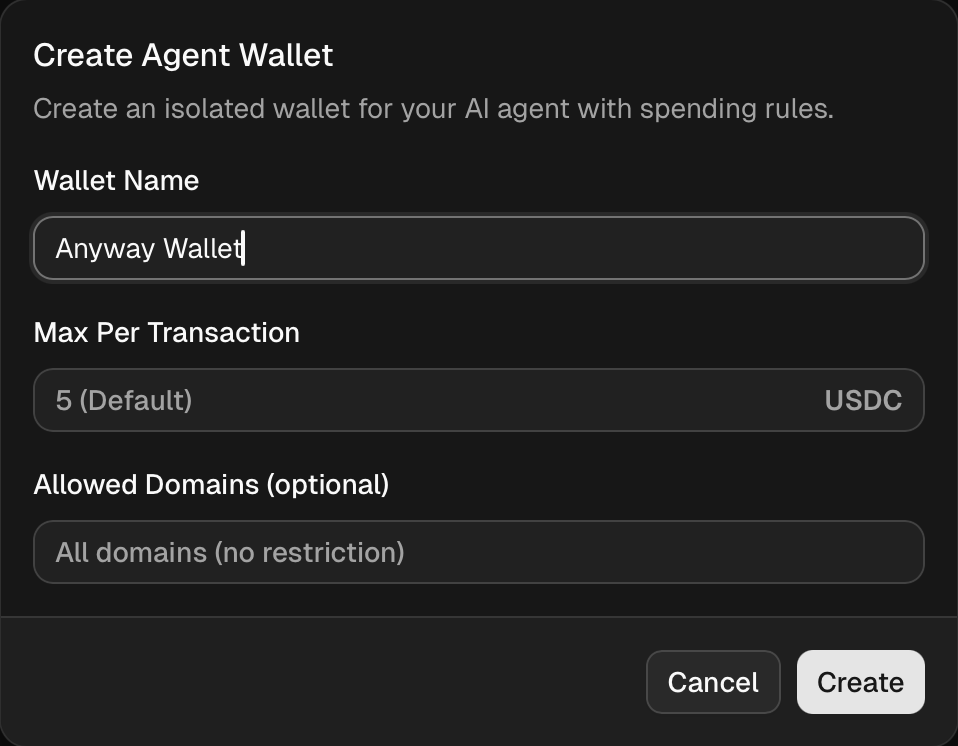 2. Wait for the creation process to complete.
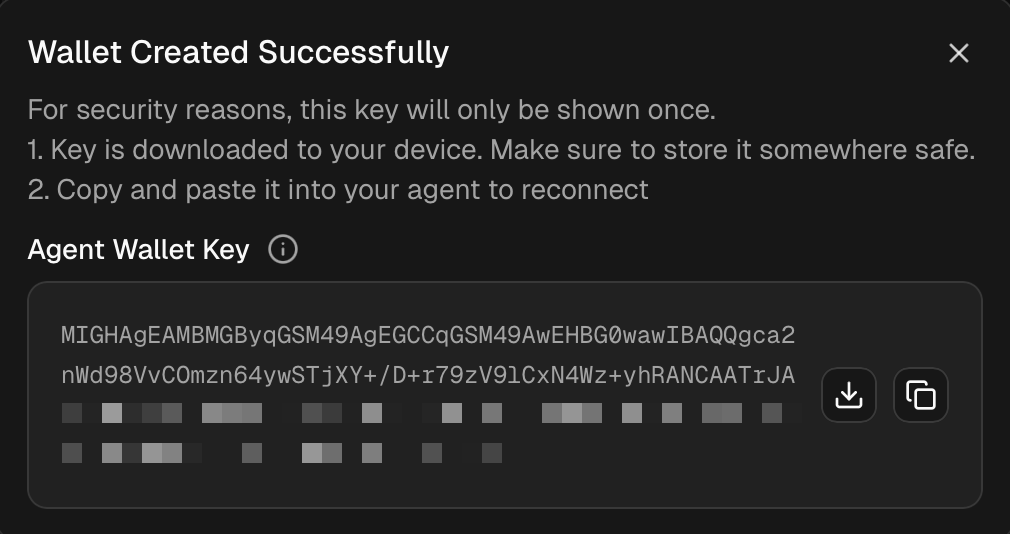
3. Once it says **"Wallet Created Successfully"**, save the Agent Wallet Key and paste it back to your agent. If your agent launched this flow from the CLI, the page may also say **"Saved to CLI. You can return to your terminal."** — in that case no manual copy is needed for that terminal session.
2. Wait for the creation process to complete.
3. Once it says **"Wallet Created Successfully"**, save the Agent Wallet Key and paste it back to your agent. If your agent launched this flow from the CLI, the page may also say **"Saved to CLI. You can return to your terminal."** — in that case no manual copy is needed for that terminal session.
 New orgs receive starter Anyway Credits when the Main Wallet is created. SuperAPI/x402 calls spend those org-level USD credits first; wallet USDC is only needed after Org Credits are insufficient.
Check credits from the agent runtime:
```bash theme={null}
anyway wallets agents credit-balance
```
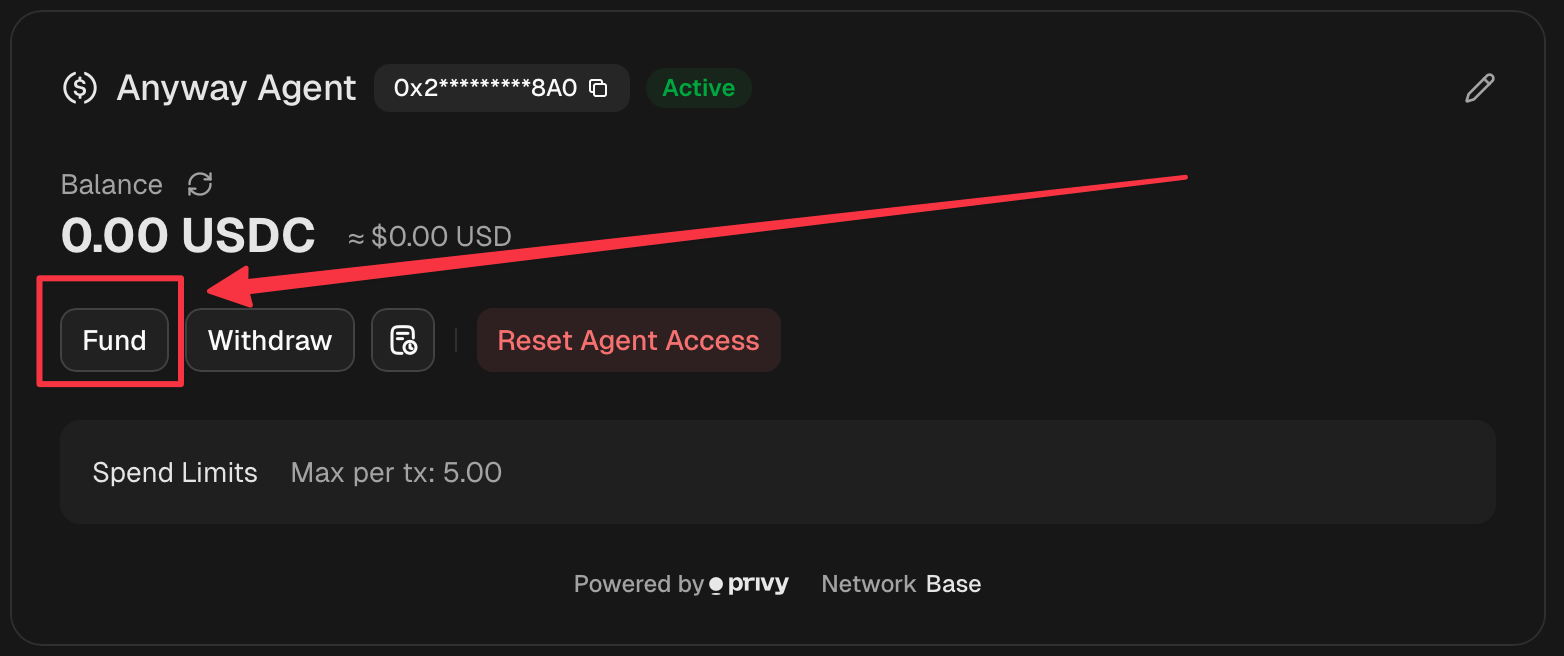
To add wallet USDC after Org Credits are insufficient, click the **Fund** button next to your Agent Wallet balance.
New orgs receive starter Anyway Credits when the Main Wallet is created. SuperAPI/x402 calls spend those org-level USD credits first; wallet USDC is only needed after Org Credits are insufficient.
Check credits from the agent runtime:
```bash theme={null}
anyway wallets agents credit-balance
```
To add wallet USDC after Org Credits are insufficient, click the **Fund** button next to your Agent Wallet balance.
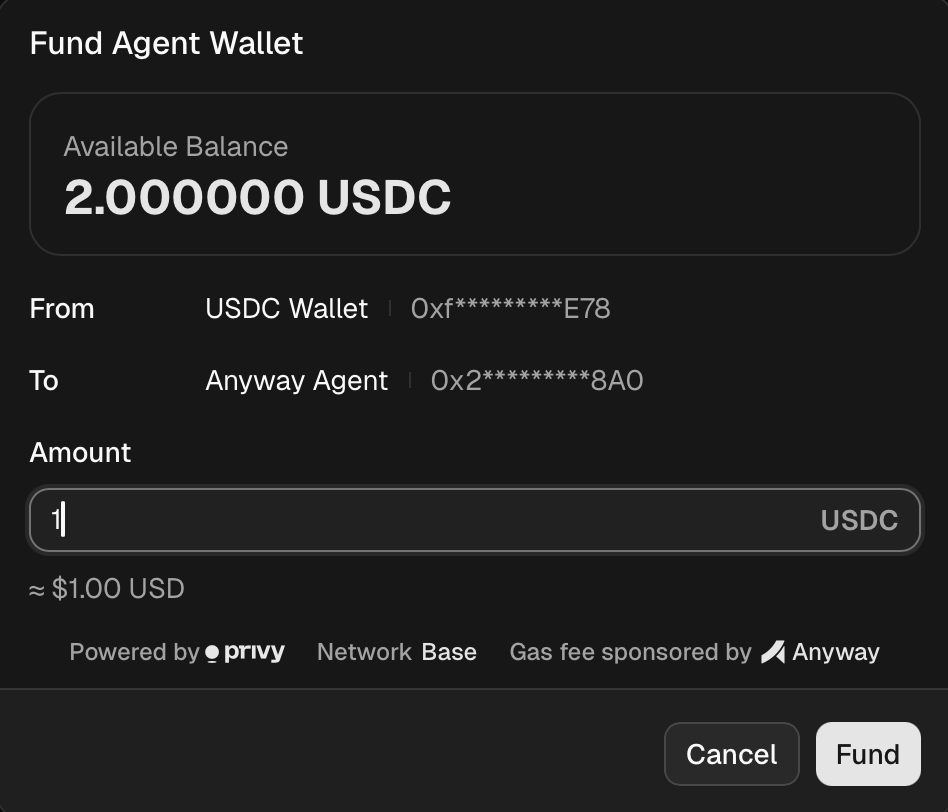
 In the modal, enter the amount to transfer from your Main Wallet and confirm.
 **Or ask your agent to request funding from the wallet owner:**
```
Ask my wallet owner to fund this agent wallet with $10 USDC after Org Credits run out.
```
Try a real paid API. Ask your agent:
```
use Anyway Agent Wallet in SuperAPI to fetch @anyway_sh's latest tweet
```
**Or ask your agent to request funding from the wallet owner:**
```
Ask my wallet owner to fund this agent wallet with $10 USDC after Org Credits run out.
```
Try a real paid API. Ask your agent:
```
use Anyway Agent Wallet in SuperAPI to fetch @anyway_sh's latest tweet
```
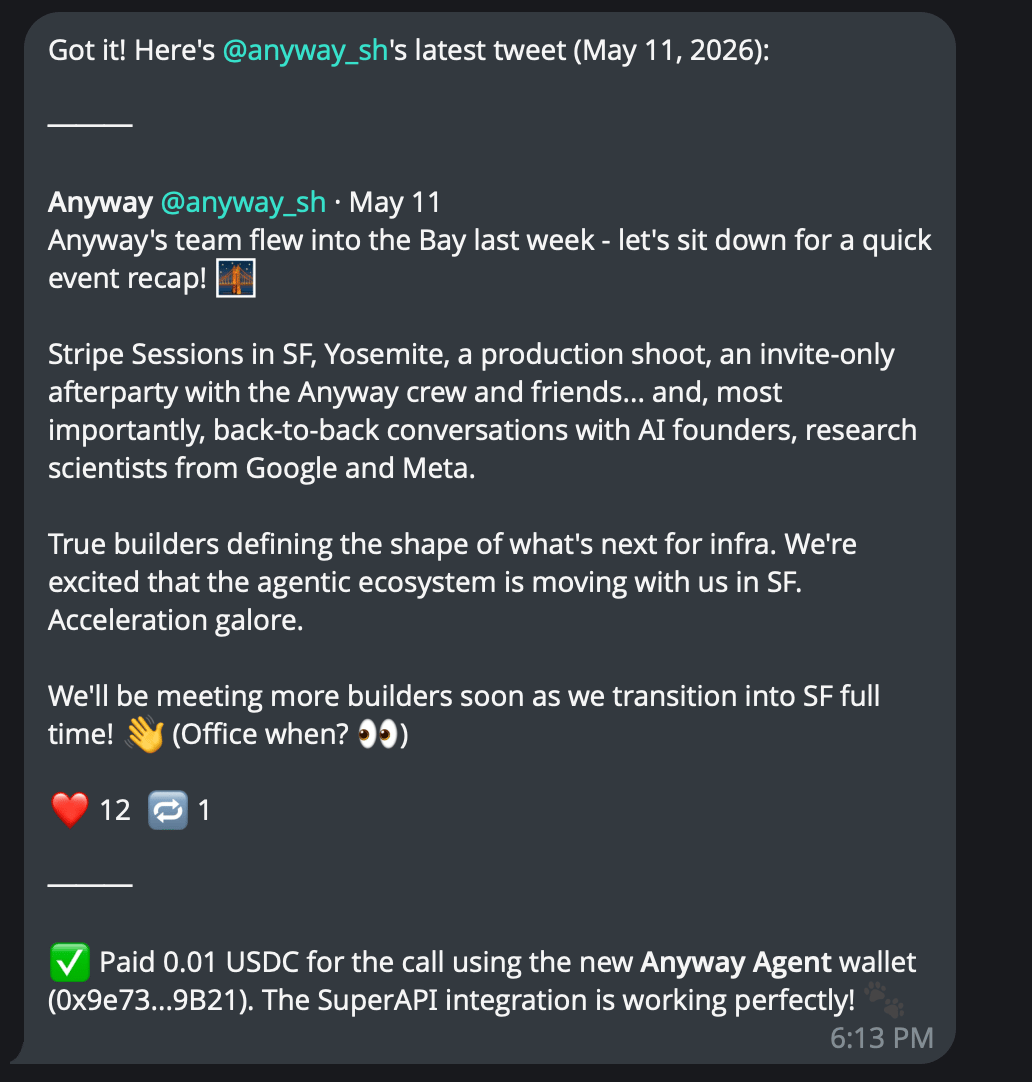 🎉 **You're done buying.**
Your agent can now autonomously pay for any Anyway SuperAPI, within the policy limits you control.
[View SuperAPI](https://app.anyway.sh/marketplace) · [Adjust Policy →](https://app.anyway.sh/wallets)
### Sell in 60 seconds
Goal: by the end of this section, you'll have a Payment Link that anyone — a human or another agent — can use to send you USDC.
Open your local agent and paste this prompt:
```
Read raw content (use curl), install and setup anyway: https://s.anyway.sh/SKILL.md
```
**Where to paste for Claude Code:** Paste directly into the chat.
```
Read raw content (use curl), install and setup anyway: https://s.anyway.sh/SKILL.md
```
**Where to paste for Cursor:** Paste into the chat, or save to `.cursor/rules/anyway.md` to make it persistent across sessions.
```
Read raw content (use curl), install and setup anyway: https://s.anyway.sh/SKILL.md
```
**Where to paste for Codex:** Paste into the chat.
```
Read raw content (use curl), install and setup anyway: https://s.anyway.sh/SKILL.md
```
**Where to paste for OpenClaw:** Paste into the chat.
```
Read raw content (use curl), install and setup anyway: https://s.anyway.sh/SKILL.md
```
**Where to paste for Hermes:** Paste into the system prompt or chat.
```
Read raw content (use curl), install and setup anyway: https://s.anyway.sh/SKILL.md
```
**Where to paste for Other:** Append the contents of skills/SKILL.md to your project's instructions so every future session starts with this capability.
**Your agent will say:**
```
🔗 Anyway — Get paid in USDC, instantly
Anyway lets you (or your agent) accept USDC payments via a single
link. No KYC, zero gas for the payer.
I'll set up your wallet + first Payment Link. ~60 seconds.
1. Open this link to sign up / log in:
👉 https://app.anyway.sh/cli-auth?callback_port=0
2. After signup, you'll see your Agent Token. Copy and paste it here.
⏳ Waiting for your token...
```
🎉 **You're done buying.**
Your agent can now autonomously pay for any Anyway SuperAPI, within the policy limits you control.
[View SuperAPI](https://app.anyway.sh/marketplace) · [Adjust Policy →](https://app.anyway.sh/wallets)
### Sell in 60 seconds
Goal: by the end of this section, you'll have a Payment Link that anyone — a human or another agent — can use to send you USDC.
Open your local agent and paste this prompt:
```
Read raw content (use curl), install and setup anyway: https://s.anyway.sh/SKILL.md
```
**Where to paste for Claude Code:** Paste directly into the chat.
```
Read raw content (use curl), install and setup anyway: https://s.anyway.sh/SKILL.md
```
**Where to paste for Cursor:** Paste into the chat, or save to `.cursor/rules/anyway.md` to make it persistent across sessions.
```
Read raw content (use curl), install and setup anyway: https://s.anyway.sh/SKILL.md
```
**Where to paste for Codex:** Paste into the chat.
```
Read raw content (use curl), install and setup anyway: https://s.anyway.sh/SKILL.md
```
**Where to paste for OpenClaw:** Paste into the chat.
```
Read raw content (use curl), install and setup anyway: https://s.anyway.sh/SKILL.md
```
**Where to paste for Hermes:** Paste into the system prompt or chat.
```
Read raw content (use curl), install and setup anyway: https://s.anyway.sh/SKILL.md
```
**Where to paste for Other:** Append the contents of skills/SKILL.md to your project's instructions so every future session starts with this capability.
**Your agent will say:**
```
🔗 Anyway — Get paid in USDC, instantly
Anyway lets you (or your agent) accept USDC payments via a single
link. No KYC, zero gas for the payer.
I'll set up your wallet + first Payment Link. ~60 seconds.
1. Open this link to sign up / log in:
👉 https://app.anyway.sh/cli-auth?callback_port=0
2. After signup, you'll see your Agent Token. Copy and paste it here.
⏳ Waiting for your token...
```
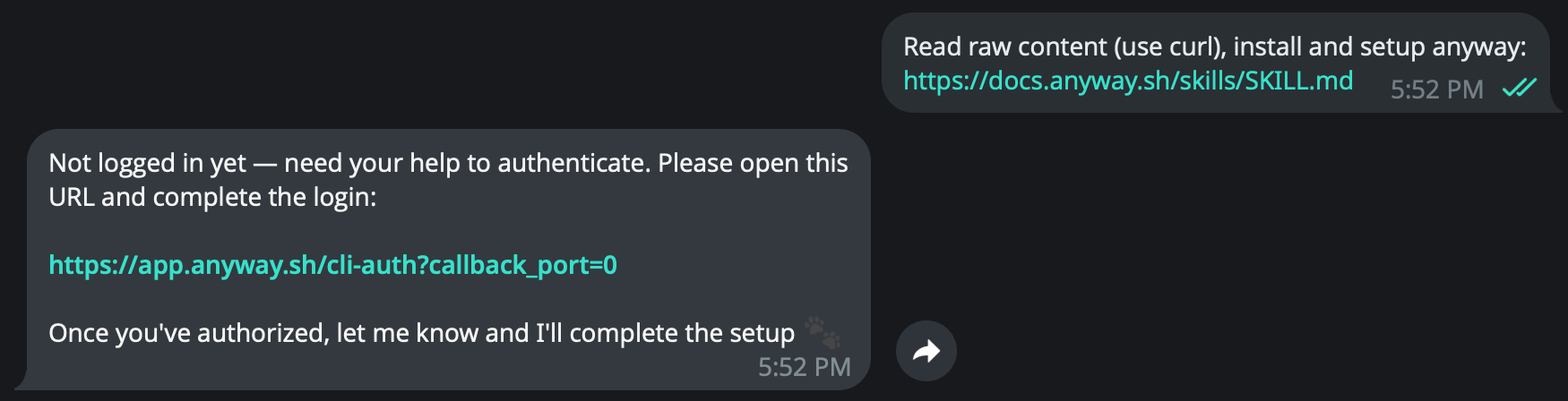 Click the link your agent gave you. You'll land on a single page that handles the sign-in authentication process automatically:
| Step | You do | Anyway does |
| ---- | --------------------------- | -------------------------------------------- |
| 1 | Email OTP or Google sign-in | Creates your Anyway account |
| 2 | Tick "I agree" + reCAPTCHA | Records TOS consent for non-custodial wallet |
| 3 | *automatic* | Creates your **Main Wallet** (USDC on Base) |
Click the link your agent gave you. You'll land on a single page that handles the sign-in authentication process automatically:
| Step | You do | Anyway does |
| ---- | --------------------------- | -------------------------------------------- |
| 1 | Email OTP or Google sign-in | Creates your Anyway account |
| 2 | Tick "I agree" + reCAPTCHA | Records TOS consent for non-custodial wallet |
| 3 | *automatic* | Creates your **Main Wallet** (USDC on Base) |
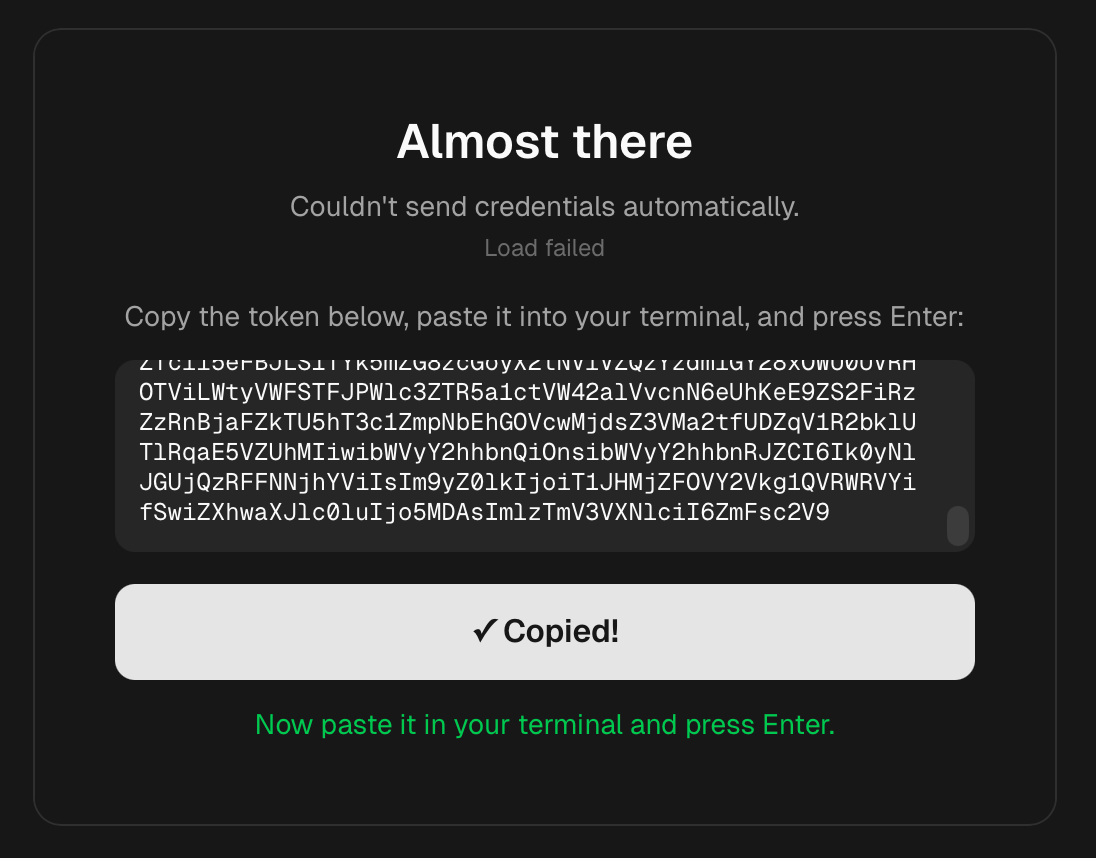 **Your agent will say:**
```
✅ Connected to Anyway as you@example.com
Here's everything you need to start receiving payments:
💰 Main Wallet
Address: 0x1a2B...9cD4 (USDC on Base)
🔗 Payment Link (accepts any amount)
https://app.anyway.sh/pay/PL26SJX3OPX7UYZA
🤖 Pay-Agent API (for other agents to pay you autonomously)
GET https://app-prod.anyway.sh/v1/pay/agent/PL26SJX3OPX7UYZA
Share the Payment Link with anyone — humans see a checkout page,
agents call the API to pay programmatically.
```
**Your agent will say:**
```
✅ Connected to Anyway as you@example.com
Here's everything you need to start receiving payments:
💰 Main Wallet
Address: 0x1a2B...9cD4 (USDC on Base)
🔗 Payment Link (accepts any amount)
https://app.anyway.sh/pay/PL26SJX3OPX7UYZA
🤖 Pay-Agent API (for other agents to pay you autonomously)
GET https://app-prod.anyway.sh/v1/pay/agent/PL26SJX3OPX7UYZA
Share the Payment Link with anyone — humans see a checkout page,
agents call the API to pay programmatically.
```
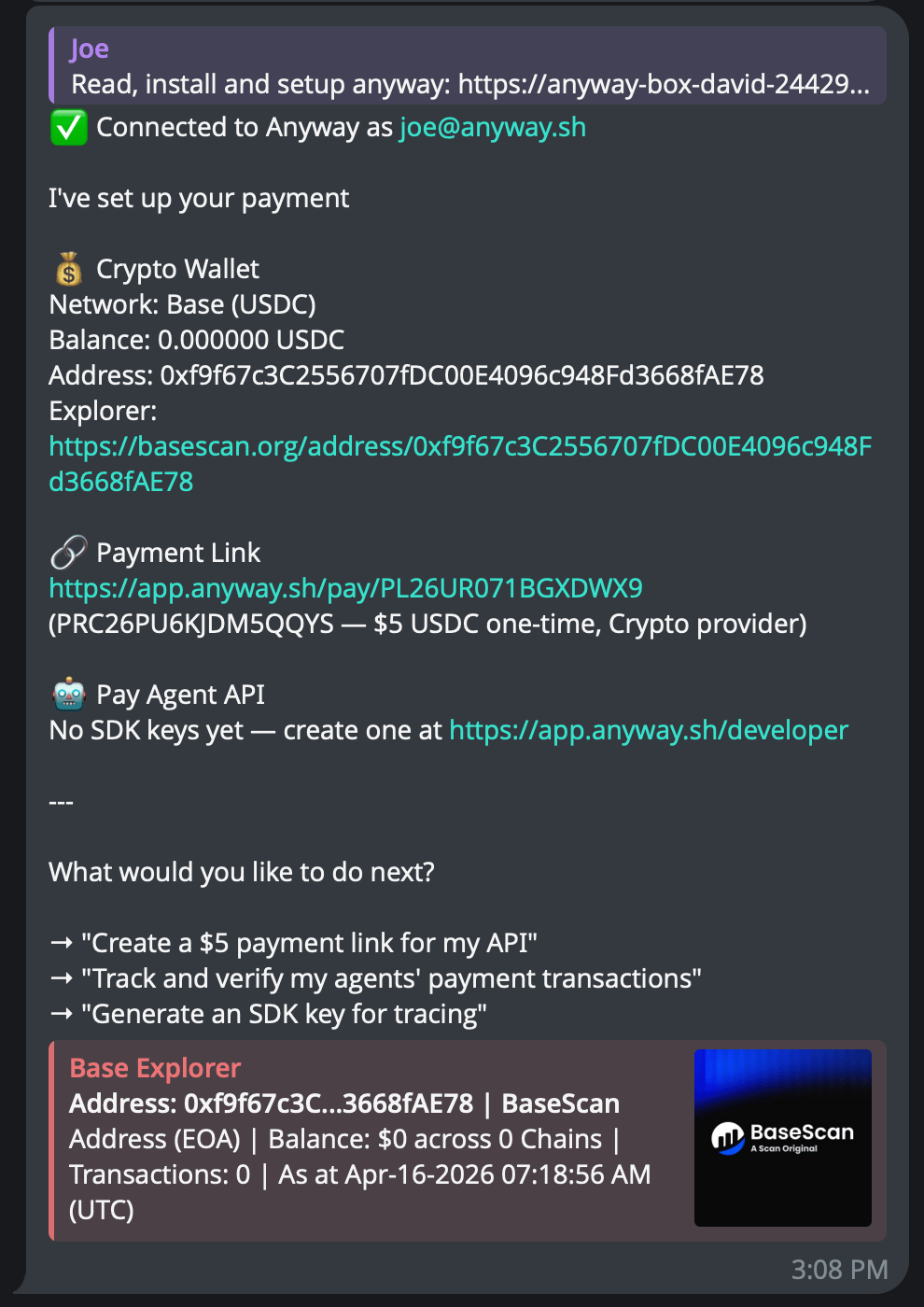 Paste the URL in DM, email, or social bio. They see a fast checkout page.
Share the `/v1/pay/agent/` endpoint for programmatic payments.
Ask your agent. No dashboard needed:
```
Create a $25 fixed-amount payment link for my API consulting service.
```
```
Create a flexible payment link for tipping, with a default suggestion of $5.
```
🎉 **You're done selling.**
Funds settle on-chain to your Main Wallet in under a second. View, withdraw, or move USDC any time.
[View Wallets](https://app.anyway.sh/wallets)
Paste the URL in DM, email, or social bio. They see a fast checkout page.
Share the `/v1/pay/agent/` endpoint for programmatic payments.
Ask your agent. No dashboard needed:
```
Create a $25 fixed-amount payment link for my API consulting service.
```
```
Create a flexible payment link for tipping, with a default suggestion of $5.
```
🎉 **You're done selling.**
Funds settle on-chain to your Main Wallet in under a second. View, withdraw, or move USDC any time.
[View Wallets](https://app.anyway.sh/wallets)