> ## Documentation Index
> Fetch the complete documentation index at: https://docs.anyway.sh/llms.txt
> Use this file to discover all available pages before exploring further.
# SuperAPI
> Pay-per-call API gateway — access search, crypto, AI, and more through a unified x402 interface
Anyway SuperAPI is a pay-per-call API gateway that gives you access to 60+ endpoints through a single interface using the [x402 payment protocol](https://x402.org). Pay with USDC on Base — no API keys, no subscriptions.
Explore available APIs, check health status, and get code examples.
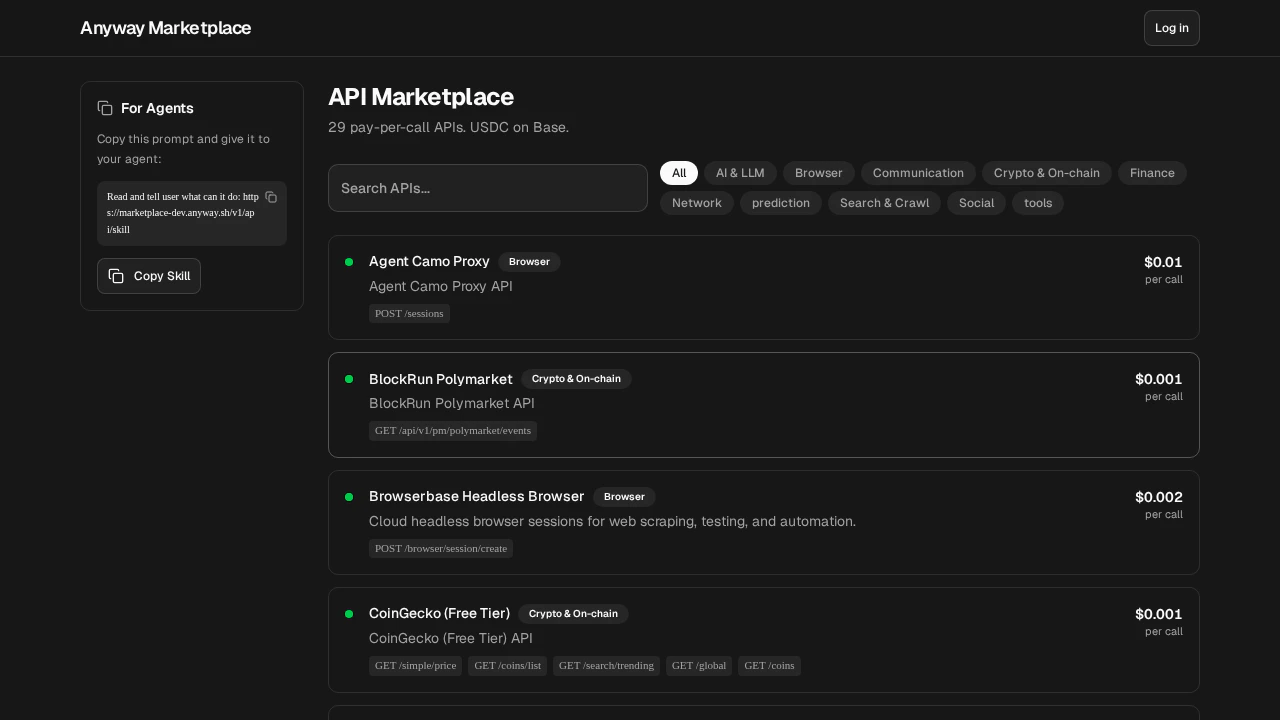 ## Quick Start
### 1. Discover available APIs
**Always call the discovery and info endpoints before making any API call.** Skipping this is the #1 cause of errors (wrong service ID, wrong method, wrong params, wrong path).
**Step A — Find the service.** Browse all available APIs:
```bash theme={null}
curl https://marketplace-prod.anyway.sh/v1/api/directory/llm
```
Each entry includes `id` (use this in URLs, not `name`), `info_url`, and `endpoints[].url` (full callable URL).
Common service IDs: `stableenrich` (search), `twit-sh` (Twitter/X), `coinmarketcap` (crypto), `robtex` (DNS), `tx402` (LLM).
**Step B — Get endpoint details.** Fetch the info page for the service you want:
```bash theme={null}
curl https://marketplace-prod.anyway.sh/v1/api/info/{service_id}
```
The response includes the correct HTTP method, parameter names, `notes` (gotchas), and a **copy-paste ready `curl_x402`** command per endpoint. The info response also includes a complete `example_code` (Python) that you can run directly.
### 2. Make a paid API call
You need a wallet to pay for API calls. If you don't have one yet, [create an Agent Wallet](/features/agent-wallet#getting-started) first.
**Start from the code examples in this document, then modify.** Copy the code below as your starting point and change the URL/parameters — don't construct requests from scratch or guess parameter names yourself.
If you have `@anyway-sh/cli` installed and either `ANYWAY_AGENT_WALLET_KEY` set or the same bundle imported with `anyway wallets agents import --token `, use `anyway superapi call `. It pays with that Agent Wallet Key by default and hides all the bundle parsing / publicKey derivation / P-256 auth signing / JCS canonicalization / P1363→DER conversion / EIP-712 typed-data construction / `PAYMENT-SIGNATURE` retry work.
```bash theme={null}
anyway superapi call "https://marketplace-prod.anyway.sh/v1/api/x402/twit-sh/tweets/search?words=bitcoin&count=5"
```
For POST endpoints, pass the request body from the endpoint info response:
```bash theme={null}
URL=""
anyway superapi call "$URL" \
--body '{"query":"open source payment APIs"}'
```
The command first calls the endpoint without payment. If SuperAPI returns 402, it decodes `PAYMENT-REQUIRED`, shows the quote, signs the quoted USDC authorization with the selected Agent Wallet after confirmation, retries with `PAYMENT-SIGNATURE`, then prints the API result. Use `--format json` if you want the response, payment metadata, and headers in one machine-readable object.
`anyway superapi call` is a paid call. After SuperAPI returns the quote, the CLI shows the amount and asks for `y/N` before signing. Use `--yes` or `-y` only in CI/agent runtimes where you want to approve the quoted payment automatically. Balance and policy limits remain the spending guardrails.
`anyway superapi call` pays with the configured Agent Wallet Key by default. `--pay-with agent-wallet` is accepted for compatibility, but it is not required.
`anyway wallets agents pay` is still available as the lower-level signing command when you want to inspect the 402 challenge and assemble the x402 retry yourself. Most users should start with `anyway superapi call `.
If you don't want the CLI as a dependency and prefer to do the signing yourself in the same JS process — the [Agent Wallet](/features/agent-wallet) P-256 key handles authentication; the rest is EIP-712 construction:
```javascript theme={null}
import crypto from "crypto";
const BASE = "https://marketplace-prod.anyway.sh";
// ── Parse Agent Wallet Key ────────────────────────────────
const key = JSON.parse(
Buffer.from(process.env.ANYWAY_AGENT_WALLET_KEY, "base64url").toString()
);
// ── Auth helpers ─────────────────────────────────────────
const privateKey = crypto.createPrivateKey({
key: Buffer.from(key.privateKey, "base64"), type: "pkcs8", format: "der",
});
const pubkey = crypto.createPublicKey(privateKey)
.export({ type: "spki", format: "der" }).toString("base64");
const sign = (data) => crypto.sign("sha256", Buffer.from(data),
{ key: privateKey, dsaEncoding: "der" }).toString("base64");
// Agent API auth: P-256 sig over "METHOD\nPATH\nTIMESTAMP"
function authHeaders(method, path) {
const ts = String(Math.floor(Date.now() / 1000));
return {
"Content-Type": "application/json",
"X-Agent-Pubkey": pubkey,
"X-Agent-Timestamp": ts,
"X-Agent-Signature": sign(`${method}\n${path}\n${ts}`),
};
}
// ⚠️ Privy auth sig MUST be JCS-canonicalized (sorted keys), not JSON.stringify
function jcs(v) {
if (v === null || typeof v !== "object") return JSON.stringify(v);
if (Array.isArray(v)) return `[${v.map(jcs).join(",")}]`;
return `{${Object.keys(v).sort().map(k => `${JSON.stringify(k)}:${jcs(v[k])}`).join(",")}}`;
}
// ── Payment flow ─────────────────────────────────────────
// 1. Get wallet info from API
const { data: wallet } = await (await fetch("https://app-prod.anyway.sh/v1/agent-wallet",
{ headers: authHeaders("GET", "/v1/agent-wallet") })).json();
// 2. Call SuperAPI endpoint → 402 challenge
// GET endpoints (e.g. twit-sh, robtex): params in URL query string
// POST endpoints (e.g. stableenrich, tx402): params in JSON body
// Always check /v1/api/info/{service_id} for the correct method.
const url = `${BASE}/v1/api/x402/twit-sh/tweets/search?words=bitcoin&count=5`;
const res = await fetch(url);
const challenge = JSON.parse(
Buffer.from(res.headers.get("payment-required"), "base64").toString()
);
const accepted = challenge.accepts[0];
// 3. Build EIP-712 typed data from challenge
const typedData = {
domain: {
name: accepted.extra.name, version: accepted.extra.version,
chainId: Number(accepted.network.split(":")[1]),
verifyingContract: accepted.asset,
},
types: { // ⚠️ Must include BOTH EIP712Domain and TransferWithAuthorization
EIP712Domain: [
{ name: "name", type: "string" }, { name: "version", type: "string" },
{ name: "chainId", type: "uint256" }, { name: "verifyingContract", type: "address" },
],
TransferWithAuthorization: [
{ name: "from", type: "address" }, { name: "to", type: "address" },
{ name: "value", type: "uint256" }, { name: "validAfter", type: "uint256" },
{ name: "validBefore", type: "uint256" }, { name: "nonce", type: "bytes32" },
],
},
primary_type: "TransferWithAuthorization", // ⚠️ must be snake_case
message: {
from: wallet.walletAddress, to: accepted.payTo, value: accepted.amount,
validAfter: "0", validBefore: String(Math.floor(Date.now() / 1000) + 600),
nonce: "0x" + crypto.randomBytes(32).toString("hex"),
},
};
// 4. Sign via Anyway Wallet
// - Privy auth sig = P-256 over JCS-canonicalized CAIP-222 payload
// - Agent auth headers = P-256 over "POST\n/path\ntimestamp"
const privySig = sign(jcs({
version: 1, method: "POST",
url: `https://api.privy.io/v1/wallets/${wallet.providerWalletId}/rpc`, // ⚠️ exact path must be /rpc
body: { method: "eth_signTypedData_v4", params: { typed_data: typedData } },
headers: { "privy-app-id": wallet.appId },
}));
const signPath = "/v1/agent-wallet/sign-typed-data";
const { data: { signature } } = await (await fetch(`https://app-prod.anyway.sh${signPath}`, {
method: "POST", headers: authHeaders("POST", signPath),
body: JSON.stringify({ typed_data: typedData, signature: privySig }),
})).json();
// 5. Retry with PAYMENT-SIGNATURE → get result
const settled = await fetch(url, {
headers: {
"PAYMENT-SIGNATURE": Buffer.from(JSON.stringify({
x402Version: 2, scheme: accepted.scheme, network: accepted.network,
accepted, payload: { signature, authorization: typedData.message },
})).toString("base64"),
},
});
console.log(await settled.json());
```
Key points — copy the code above exactly:
* Field name is `primary_type` (snake\_case)
* `types` includes both `EIP712Domain` and `TransferWithAuthorization`
* Privy auth sig URL path is `/rpc`
* Privy auth sig payload must be **JCS-canonicalized** (sorted keys) before signing
If you have a raw Ethereum private key (`0x...`) with USDC on Base. Requires `ethers` (`npm install ethers`):
```javascript theme={null}
import { ethers } from "ethers";
const wallet = new ethers.Wallet("0x...");
const BASE = "https://marketplace-prod.anyway.sh";
// 1. Call endpoint → 402 challenge
// GET endpoints (e.g. twit-sh): query string. POST endpoints (e.g. stableenrich): JSON body.
const url = `${BASE}/v1/api/x402/twit-sh/tweets/search?words=bitcoin&count=5`;
const res = await fetch(url);
const challenge = JSON.parse(
Buffer.from(res.headers.get("payment-required"), "base64").toString()
);
const accepted = challenge.accepts[0];
// 2. Sign EIP-3009 TransferWithAuthorization
const now = Math.floor(Date.now() / 1000);
const nonce = ethers.hexlify(ethers.randomBytes(32));
const domain = {
name: accepted.extra.name, version: accepted.extra.version,
chainId: Number(accepted.network.split(":")[1]),
verifyingContract: accepted.asset,
};
const types = {
TransferWithAuthorization: [
{ name: "from", type: "address" }, { name: "to", type: "address" },
{ name: "value", type: "uint256" }, { name: "validAfter", type: "uint256" },
{ name: "validBefore", type: "uint256" }, { name: "nonce", type: "bytes32" },
],
};
const message = {
from: wallet.address, to: accepted.payTo, value: accepted.amount,
validAfter: 0, validBefore: now + 600, nonce,
};
const signature = await wallet.signTypedData(domain, types, message);
// 3. Retry with PAYMENT-SIGNATURE
const settled = await fetch(url, {
headers: {
"PAYMENT-SIGNATURE": Buffer.from(JSON.stringify({
x402Version: 2, scheme: accepted.scheme, network: accepted.network,
accepted,
payload: {
signature,
authorization: {
from: wallet.address, to: accepted.payTo, value: accepted.amount,
validAfter: "0", validBefore: String(now + 600), nonce,
},
},
})).toString("base64"),
},
});
console.log(await settled.json());
```
The examples above use **GET** (twit-sh). For **POST** endpoints (e.g. `stableenrich`), pass params in a JSON body instead: `anyway superapi call "$URL" --body '{...}'` in the CLI, or `method: "POST"` plus a JSON body in code. Always check `/v1/api/info/{service_id}` for the correct `method` per endpoint.
## Available APIs
Pay-per-call with USDC on Base. Prices are set per endpoint and can change, so the live cost is always returned in the `402` payment challenge (and listed per service via the directory/info endpoints below) rather than duplicated here:
| Category | Services |
| -------------- | ---------------------------------------------------------------------------------------------------------------------------------------------------------------- |
| **AI** | tx402 (LLM chat), MiniMax (chat/TTS/video/image/music), Z-AI (chat/image/video), PQS prompt scoring, DellBot, OBAgents |
| **Search** | StableEnrich (8-in-1: Exa, Serper, Firecrawl, Apollo, etc.), Scout HN/NPM, Content Intel, UtilsForAgents |
| **Crypto** | CoinMarketCap, Nansen, DefiLlama, Zapper, PrintMoneyLab (KR prices/kimchi premium), multi-chain gas |
| **Social** | twit.sh (Twitter/X) |
| **Prediction** | Polymarket, Manifold, BlockRun |
| **Finance** | Frankfurter FX, Currency-api, VATComply, GlobalEcon |
| **Network** | Robtex DNS, WHOIS |
| **Browser** | Agent Camo proxy, Screenshot |
| **Other** | StableTravel (flights/airports), ReloadPi (eSIMs/vouchers/topups), Toulaw (legal search), Boundary Guard (injection detection), StableUpload, Wurk (crowdsource) |
Run `curl https://marketplace-prod.anyway.sh/v1/api/directory/llm` for a compact listing with `info_url` per service, or `curl https://marketplace-prod.anyway.sh/v1/api/directory` for the full list with health status.
## How It Works
```
You → SuperAPI → Payment (USDC on Base) → API Response
```
Call the SuperAPI endpoint with your API request. No auth headers needed.
SuperAPI returns HTTP 402 with a `PAYMENT-REQUIRED` header containing the price and payment details. The response also includes an `X-Api-Info-Url` header pointing to the endpoint's documentation.
Sign an EIP-3009 `transferWithAuthorization` — either with `anyway superapi call` after quote confirmation, directly with your wallet key, or via the Anyway Wallet signing service.
Payment is verified and settled on-chain. The API result is returned.
## Quick Start
### 1. Discover available APIs
**Always call the discovery and info endpoints before making any API call.** Skipping this is the #1 cause of errors (wrong service ID, wrong method, wrong params, wrong path).
**Step A — Find the service.** Browse all available APIs:
```bash theme={null}
curl https://marketplace-prod.anyway.sh/v1/api/directory/llm
```
Each entry includes `id` (use this in URLs, not `name`), `info_url`, and `endpoints[].url` (full callable URL).
Common service IDs: `stableenrich` (search), `twit-sh` (Twitter/X), `coinmarketcap` (crypto), `robtex` (DNS), `tx402` (LLM).
**Step B — Get endpoint details.** Fetch the info page for the service you want:
```bash theme={null}
curl https://marketplace-prod.anyway.sh/v1/api/info/{service_id}
```
The response includes the correct HTTP method, parameter names, `notes` (gotchas), and a **copy-paste ready `curl_x402`** command per endpoint. The info response also includes a complete `example_code` (Python) that you can run directly.
### 2. Make a paid API call
You need a wallet to pay for API calls. If you don't have one yet, [create an Agent Wallet](/features/agent-wallet#getting-started) first.
**Start from the code examples in this document, then modify.** Copy the code below as your starting point and change the URL/parameters — don't construct requests from scratch or guess parameter names yourself.
If you have `@anyway-sh/cli` installed and either `ANYWAY_AGENT_WALLET_KEY` set or the same bundle imported with `anyway wallets agents import --token `, use `anyway superapi call `. It pays with that Agent Wallet Key by default and hides all the bundle parsing / publicKey derivation / P-256 auth signing / JCS canonicalization / P1363→DER conversion / EIP-712 typed-data construction / `PAYMENT-SIGNATURE` retry work.
```bash theme={null}
anyway superapi call "https://marketplace-prod.anyway.sh/v1/api/x402/twit-sh/tweets/search?words=bitcoin&count=5"
```
For POST endpoints, pass the request body from the endpoint info response:
```bash theme={null}
URL=""
anyway superapi call "$URL" \
--body '{"query":"open source payment APIs"}'
```
The command first calls the endpoint without payment. If SuperAPI returns 402, it decodes `PAYMENT-REQUIRED`, shows the quote, signs the quoted USDC authorization with the selected Agent Wallet after confirmation, retries with `PAYMENT-SIGNATURE`, then prints the API result. Use `--format json` if you want the response, payment metadata, and headers in one machine-readable object.
`anyway superapi call` is a paid call. After SuperAPI returns the quote, the CLI shows the amount and asks for `y/N` before signing. Use `--yes` or `-y` only in CI/agent runtimes where you want to approve the quoted payment automatically. Balance and policy limits remain the spending guardrails.
`anyway superapi call` pays with the configured Agent Wallet Key by default. `--pay-with agent-wallet` is accepted for compatibility, but it is not required.
`anyway wallets agents pay` is still available as the lower-level signing command when you want to inspect the 402 challenge and assemble the x402 retry yourself. Most users should start with `anyway superapi call `.
If you don't want the CLI as a dependency and prefer to do the signing yourself in the same JS process — the [Agent Wallet](/features/agent-wallet) P-256 key handles authentication; the rest is EIP-712 construction:
```javascript theme={null}
import crypto from "crypto";
const BASE = "https://marketplace-prod.anyway.sh";
// ── Parse Agent Wallet Key ────────────────────────────────
const key = JSON.parse(
Buffer.from(process.env.ANYWAY_AGENT_WALLET_KEY, "base64url").toString()
);
// ── Auth helpers ─────────────────────────────────────────
const privateKey = crypto.createPrivateKey({
key: Buffer.from(key.privateKey, "base64"), type: "pkcs8", format: "der",
});
const pubkey = crypto.createPublicKey(privateKey)
.export({ type: "spki", format: "der" }).toString("base64");
const sign = (data) => crypto.sign("sha256", Buffer.from(data),
{ key: privateKey, dsaEncoding: "der" }).toString("base64");
// Agent API auth: P-256 sig over "METHOD\nPATH\nTIMESTAMP"
function authHeaders(method, path) {
const ts = String(Math.floor(Date.now() / 1000));
return {
"Content-Type": "application/json",
"X-Agent-Pubkey": pubkey,
"X-Agent-Timestamp": ts,
"X-Agent-Signature": sign(`${method}\n${path}\n${ts}`),
};
}
// ⚠️ Privy auth sig MUST be JCS-canonicalized (sorted keys), not JSON.stringify
function jcs(v) {
if (v === null || typeof v !== "object") return JSON.stringify(v);
if (Array.isArray(v)) return `[${v.map(jcs).join(",")}]`;
return `{${Object.keys(v).sort().map(k => `${JSON.stringify(k)}:${jcs(v[k])}`).join(",")}}`;
}
// ── Payment flow ─────────────────────────────────────────
// 1. Get wallet info from API
const { data: wallet } = await (await fetch("https://app-prod.anyway.sh/v1/agent-wallet",
{ headers: authHeaders("GET", "/v1/agent-wallet") })).json();
// 2. Call SuperAPI endpoint → 402 challenge
// GET endpoints (e.g. twit-sh, robtex): params in URL query string
// POST endpoints (e.g. stableenrich, tx402): params in JSON body
// Always check /v1/api/info/{service_id} for the correct method.
const url = `${BASE}/v1/api/x402/twit-sh/tweets/search?words=bitcoin&count=5`;
const res = await fetch(url);
const challenge = JSON.parse(
Buffer.from(res.headers.get("payment-required"), "base64").toString()
);
const accepted = challenge.accepts[0];
// 3. Build EIP-712 typed data from challenge
const typedData = {
domain: {
name: accepted.extra.name, version: accepted.extra.version,
chainId: Number(accepted.network.split(":")[1]),
verifyingContract: accepted.asset,
},
types: { // ⚠️ Must include BOTH EIP712Domain and TransferWithAuthorization
EIP712Domain: [
{ name: "name", type: "string" }, { name: "version", type: "string" },
{ name: "chainId", type: "uint256" }, { name: "verifyingContract", type: "address" },
],
TransferWithAuthorization: [
{ name: "from", type: "address" }, { name: "to", type: "address" },
{ name: "value", type: "uint256" }, { name: "validAfter", type: "uint256" },
{ name: "validBefore", type: "uint256" }, { name: "nonce", type: "bytes32" },
],
},
primary_type: "TransferWithAuthorization", // ⚠️ must be snake_case
message: {
from: wallet.walletAddress, to: accepted.payTo, value: accepted.amount,
validAfter: "0", validBefore: String(Math.floor(Date.now() / 1000) + 600),
nonce: "0x" + crypto.randomBytes(32).toString("hex"),
},
};
// 4. Sign via Anyway Wallet
// - Privy auth sig = P-256 over JCS-canonicalized CAIP-222 payload
// - Agent auth headers = P-256 over "POST\n/path\ntimestamp"
const privySig = sign(jcs({
version: 1, method: "POST",
url: `https://api.privy.io/v1/wallets/${wallet.providerWalletId}/rpc`, // ⚠️ exact path must be /rpc
body: { method: "eth_signTypedData_v4", params: { typed_data: typedData } },
headers: { "privy-app-id": wallet.appId },
}));
const signPath = "/v1/agent-wallet/sign-typed-data";
const { data: { signature } } = await (await fetch(`https://app-prod.anyway.sh${signPath}`, {
method: "POST", headers: authHeaders("POST", signPath),
body: JSON.stringify({ typed_data: typedData, signature: privySig }),
})).json();
// 5. Retry with PAYMENT-SIGNATURE → get result
const settled = await fetch(url, {
headers: {
"PAYMENT-SIGNATURE": Buffer.from(JSON.stringify({
x402Version: 2, scheme: accepted.scheme, network: accepted.network,
accepted, payload: { signature, authorization: typedData.message },
})).toString("base64"),
},
});
console.log(await settled.json());
```
Key points — copy the code above exactly:
* Field name is `primary_type` (snake\_case)
* `types` includes both `EIP712Domain` and `TransferWithAuthorization`
* Privy auth sig URL path is `/rpc`
* Privy auth sig payload must be **JCS-canonicalized** (sorted keys) before signing
If you have a raw Ethereum private key (`0x...`) with USDC on Base. Requires `ethers` (`npm install ethers`):
```javascript theme={null}
import { ethers } from "ethers";
const wallet = new ethers.Wallet("0x...");
const BASE = "https://marketplace-prod.anyway.sh";
// 1. Call endpoint → 402 challenge
// GET endpoints (e.g. twit-sh): query string. POST endpoints (e.g. stableenrich): JSON body.
const url = `${BASE}/v1/api/x402/twit-sh/tweets/search?words=bitcoin&count=5`;
const res = await fetch(url);
const challenge = JSON.parse(
Buffer.from(res.headers.get("payment-required"), "base64").toString()
);
const accepted = challenge.accepts[0];
// 2. Sign EIP-3009 TransferWithAuthorization
const now = Math.floor(Date.now() / 1000);
const nonce = ethers.hexlify(ethers.randomBytes(32));
const domain = {
name: accepted.extra.name, version: accepted.extra.version,
chainId: Number(accepted.network.split(":")[1]),
verifyingContract: accepted.asset,
};
const types = {
TransferWithAuthorization: [
{ name: "from", type: "address" }, { name: "to", type: "address" },
{ name: "value", type: "uint256" }, { name: "validAfter", type: "uint256" },
{ name: "validBefore", type: "uint256" }, { name: "nonce", type: "bytes32" },
],
};
const message = {
from: wallet.address, to: accepted.payTo, value: accepted.amount,
validAfter: 0, validBefore: now + 600, nonce,
};
const signature = await wallet.signTypedData(domain, types, message);
// 3. Retry with PAYMENT-SIGNATURE
const settled = await fetch(url, {
headers: {
"PAYMENT-SIGNATURE": Buffer.from(JSON.stringify({
x402Version: 2, scheme: accepted.scheme, network: accepted.network,
accepted,
payload: {
signature,
authorization: {
from: wallet.address, to: accepted.payTo, value: accepted.amount,
validAfter: "0", validBefore: String(now + 600), nonce,
},
},
})).toString("base64"),
},
});
console.log(await settled.json());
```
The examples above use **GET** (twit-sh). For **POST** endpoints (e.g. `stableenrich`), pass params in a JSON body instead: `anyway superapi call "$URL" --body '{...}'` in the CLI, or `method: "POST"` plus a JSON body in code. Always check `/v1/api/info/{service_id}` for the correct `method` per endpoint.
## Available APIs
Pay-per-call with USDC on Base. Prices are set per endpoint and can change, so the live cost is always returned in the `402` payment challenge (and listed per service via the directory/info endpoints below) rather than duplicated here:
| Category | Services |
| -------------- | ---------------------------------------------------------------------------------------------------------------------------------------------------------------- |
| **AI** | tx402 (LLM chat), MiniMax (chat/TTS/video/image/music), Z-AI (chat/image/video), PQS prompt scoring, DellBot, OBAgents |
| **Search** | StableEnrich (8-in-1: Exa, Serper, Firecrawl, Apollo, etc.), Scout HN/NPM, Content Intel, UtilsForAgents |
| **Crypto** | CoinMarketCap, Nansen, DefiLlama, Zapper, PrintMoneyLab (KR prices/kimchi premium), multi-chain gas |
| **Social** | twit.sh (Twitter/X) |
| **Prediction** | Polymarket, Manifold, BlockRun |
| **Finance** | Frankfurter FX, Currency-api, VATComply, GlobalEcon |
| **Network** | Robtex DNS, WHOIS |
| **Browser** | Agent Camo proxy, Screenshot |
| **Other** | StableTravel (flights/airports), ReloadPi (eSIMs/vouchers/topups), Toulaw (legal search), Boundary Guard (injection detection), StableUpload, Wurk (crowdsource) |
Run `curl https://marketplace-prod.anyway.sh/v1/api/directory/llm` for a compact listing with `info_url` per service, or `curl https://marketplace-prod.anyway.sh/v1/api/directory` for the full list with health status.
## How It Works
```
You → SuperAPI → Payment (USDC on Base) → API Response
```
Call the SuperAPI endpoint with your API request. No auth headers needed.
SuperAPI returns HTTP 402 with a `PAYMENT-REQUIRED` header containing the price and payment details. The response also includes an `X-Api-Info-Url` header pointing to the endpoint's documentation.
Sign an EIP-3009 `transferWithAuthorization` — either with `anyway superapi call` after quote confirmation, directly with your wallet key, or via the Anyway Wallet signing service.
Payment is verified and settled on-chain. The API result is returned.