> ## Documentation Index
> Fetch the complete documentation index at: https://docs.anyway.sh/llms.txt
> Use this file to discover all available pages before exploring further.
# Agent Wallet (Send Money)
> Give your AI agents their own wallet to spend USDC autonomously — with spending policies, zero custody, and full audit trails
Give your AI agent a dedicated USDC wallet on Base. The agent spends autonomously through the [SuperAPI](/features/super-api), while you set the limits. Up to 5 per organization.
**Already got an Agent Wallet Key from your owner?** Set `ANYWAY_AGENT_WALLET_KEY` or run `anyway wallets agents import --token `, then use `anyway wallets agents whoami` to confirm the agent and wallet address. Check Org Credits in [Step 2](#step-2-check-credits-and-fund-if-needed); wallet USDC is only needed after Org Credits are insufficient.
## End-to-End Path
1. **Wallet owner creates the Agent Wallet** in the webapp or with `anyway wallets agents create`.
2. **Agent runtime receives the Agent Wallet Key** as `ANYWAY_AGENT_WALLET_KEY` or imports it with `anyway wallets agents import --token `.
3. **Agent verifies identity, credits, and limits** with `anyway wallets agents whoami`, `anyway wallets agents credit-balance`, and `anyway wallets agents policies`. Wallet owners who are only using merchant login can check the same org credit pool with `anyway wallets credit balance`.
4. **Owner funds the wallet only if needed** by sending USDC to the wallet address shown by `whoami`. Anyway Credits are org-level USD credits and are applied automatically first for SuperAPI/x402 calls; wallet USDC is only needed once the org credit pool is insufficient.
5. **Agent calls SuperAPI**: discover endpoint → run `anyway superapi call ` → the CLI receives `PAYMENT-REQUIRED`, signs with the Agent Wallet Key, retries with `PAYMENT-SIGNATURE`, and prints the API result.
## Getting Started
### Step 1: Create Agent Wallet
1. Go to [Wallets](https://app.anyway.sh/wallets) → click **+ Create Agent Wallet**
2. Enter a name and spending limit (max per transaction, default \$5)
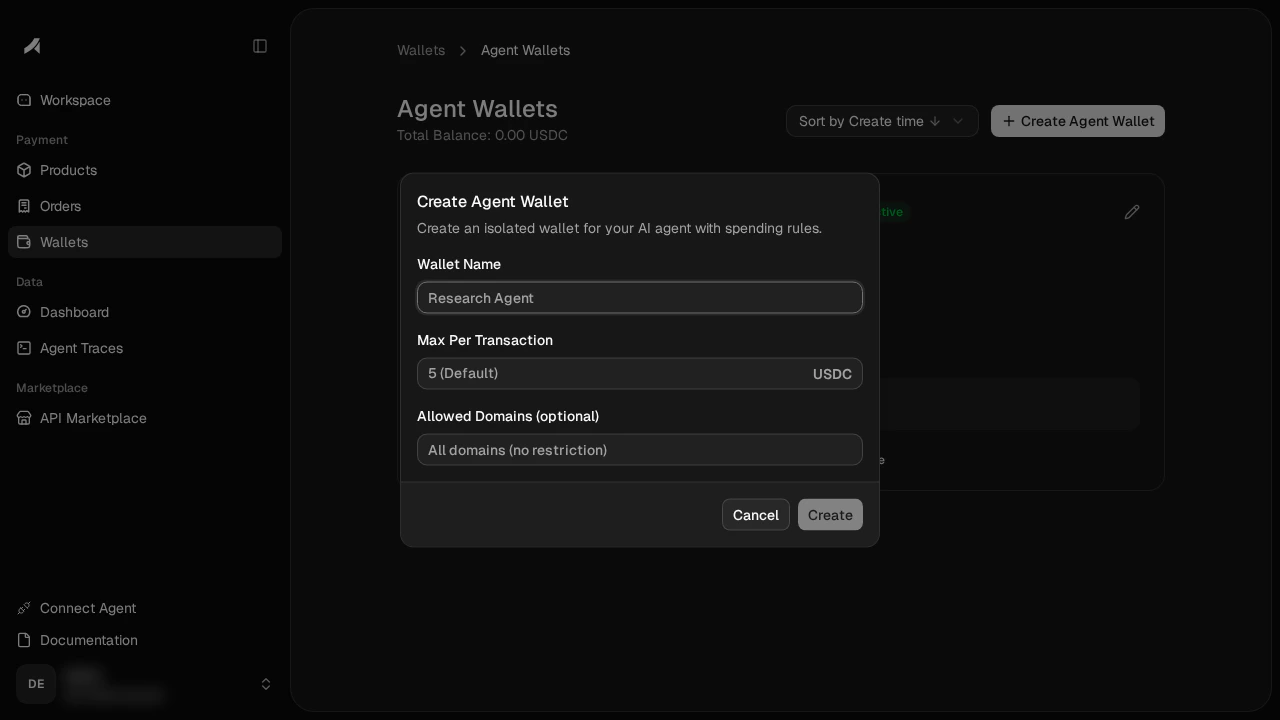 3. Click **Create** — the wizard creates the wallet, generates the signing keypair, delegates access, and sets the spending policy in one step. By default, the agent gets a **\$5 max per transaction** cap and **direct sends are blocked** (the agent can only pay through x402, not transfer USDC freely)
4. **Save the Agent Wallet Key** — it's shown once and cannot be retrieved later. The key is a base64url-encoded JSON string containing just the signing key
You can update the spending limit anytime via the **Edit** (pencil icon) on the agent wallet card.
```bash theme={null}
# Interactive: opens browser to complete setup, then stores the verified key locally
anyway wallets agents create --name "My Agent"
# Headless / agent: non-blocking begin → continue → restart
anyway wallets agents create --name "My Agent" --non-interactive # begin: prints URL, exits
anyway wallets agents create --non-interactive --continue # resume, wait ~60s for approval
anyway wallets agents create --non-interactive --restart # discard a stuck session, start over
```
Interactive create waits while you finish Privy signing in the browser. When the reveal dialog opens, the browser downloads the Agent Wallet Key, posts it back to the CLI, and the terminal prints a non-secret summary after verification. The private key is never printed in the terminal.
**Headless / agent (`--non-interactive`)** — the flow never holds a long blocking call:
1. **begin** — `... create --non-interactive` opens a session, prints the verification URL (share it with the wallet owner), and exits immediately.
2. **Owner authorizes** in the browser.
3. **continue** — `... --continue` resumes and waits up to \~60s, exiting with `approved` | `pending` | `expired` | `denied`. Call again while `pending`; use `--restart` to start over.
The session — including the ephemeral key that decrypts the bundle — is persisted `0600` under `~/.anyway/device/`, so `--continue` works from a fresh process and you never have to paste the bundle. A non-TTY stdin (piped / CI / agent) selects this flow automatically, so `--non-interactive` is optional there. Output follows `--format` as with any command — add `--format json` for a single JSON line.
If the browser says the CLI connection failed, copy the displayed bundle and run `anyway wallets agents import --token `.
### Agent Wallet Key
The Agent Wallet Key is a base64url-encoded JSON token containing the agent's P-256 signing key:
```json theme={null}
{
"privateKey": ""
}
```
Set it as an environment variable for your agent runtime:
```bash theme={null}
export ANYWAY_AGENT_WALLET_KEY="eyJwcml2YXRl..."
```
To extract the key programmatically:
```javascript theme={null}
const key = JSON.parse(
Buffer.from(process.env.ANYWAY_AGENT_WALLET_KEY, "base64url").toString()
);
// key.privateKey → P-256 PKCS8 signing key (base64)
```
#### Deriving the public key
Every `/v1/agent-wallet/*` request needs the SPKI public key in the `X-Agent-Pubkey` header — the bundle doesn't carry it (and doesn't carry a `walletId` either). Derive the public key from the PKCS#8 private key once when you parse the bundle:
```javascript theme={null}
// Node (recommended — server-side runtimes, 3 lines):
import { createPrivateKey, createPublicKey } from "node:crypto";
const privBytes = Buffer.from(key.privateKey, "base64");
const priv = createPrivateKey({ key: privBytes, format: "der", type: "pkcs8" });
const publicKeyB64 = createPublicKey(priv)
.export({ format: "der", type: "spki" })
.toString("base64");
// publicKeyB64 → use as the X-Agent-Pubkey header value
```
```javascript theme={null}
// WebCrypto (browsers / edge runtimes without node:crypto):
// See the `derivePubKeyB64` helper in the Option A example below — it
// goes via JWK roundtrip because WebCrypto can't export a public key
// directly from a private CryptoKey.
```
The derived bytes are byte-identical across runtimes (RFC 5480 mandates a single SPKI encoding for P-256), so the same `publicKeyB64` matches what the backend stored at wallet creation time. Everything else the runtime needs (`agentId`, `walletId`, `walletAddress`, `providerWalletId`, `appId`) comes from a single `GET /v1/agent-wallet` bootstrap call once the request is authenticated.
### Step 2: Check Credits and Fund if Needed
**Anyway Credits are org-level USD credits.** Credits are not wallet USDC, are not loaded into one agent wallet, and do not change any agent wallet's USDC balance. Starter credits granted when the main wallet is created live in the org credit pool, shared by all agent wallets in that org.
For [SuperAPI](/features/super-api) (x402) payments, Anyway Credits are deducted automatically before wallet USDC. Credits cannot be used for direct USDC transfers, withdrawals, or refunds. To check the org credit pool from an agent runtime with an Agent Wallet Key:
```bash theme={null}
anyway wallets agents credit-balance
```
If you are the wallet owner using merchant login instead, run:
```bash theme={null}
anyway wallets credit balance
```
To add wallet USDC directly after Org Credits are insufficient:
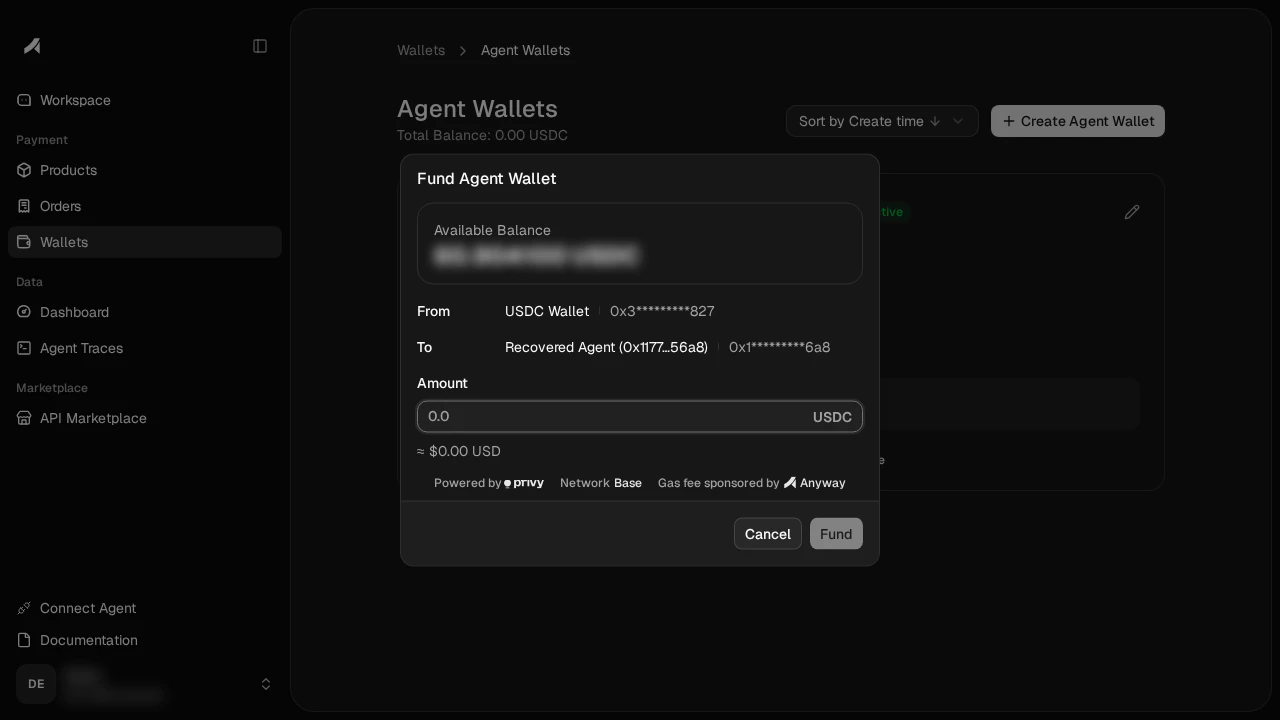
On the agent wallet card, click **↓ Fund** to transfer USDC from your main wallet to the agent wallet.
3. Click **Create** — the wizard creates the wallet, generates the signing keypair, delegates access, and sets the spending policy in one step. By default, the agent gets a **\$5 max per transaction** cap and **direct sends are blocked** (the agent can only pay through x402, not transfer USDC freely)
4. **Save the Agent Wallet Key** — it's shown once and cannot be retrieved later. The key is a base64url-encoded JSON string containing just the signing key
You can update the spending limit anytime via the **Edit** (pencil icon) on the agent wallet card.
```bash theme={null}
# Interactive: opens browser to complete setup, then stores the verified key locally
anyway wallets agents create --name "My Agent"
# Headless / agent: non-blocking begin → continue → restart
anyway wallets agents create --name "My Agent" --non-interactive # begin: prints URL, exits
anyway wallets agents create --non-interactive --continue # resume, wait ~60s for approval
anyway wallets agents create --non-interactive --restart # discard a stuck session, start over
```
Interactive create waits while you finish Privy signing in the browser. When the reveal dialog opens, the browser downloads the Agent Wallet Key, posts it back to the CLI, and the terminal prints a non-secret summary after verification. The private key is never printed in the terminal.
**Headless / agent (`--non-interactive`)** — the flow never holds a long blocking call:
1. **begin** — `... create --non-interactive` opens a session, prints the verification URL (share it with the wallet owner), and exits immediately.
2. **Owner authorizes** in the browser.
3. **continue** — `... --continue` resumes and waits up to \~60s, exiting with `approved` | `pending` | `expired` | `denied`. Call again while `pending`; use `--restart` to start over.
The session — including the ephemeral key that decrypts the bundle — is persisted `0600` under `~/.anyway/device/`, so `--continue` works from a fresh process and you never have to paste the bundle. A non-TTY stdin (piped / CI / agent) selects this flow automatically, so `--non-interactive` is optional there. Output follows `--format` as with any command — add `--format json` for a single JSON line.
If the browser says the CLI connection failed, copy the displayed bundle and run `anyway wallets agents import --token `.
### Agent Wallet Key
The Agent Wallet Key is a base64url-encoded JSON token containing the agent's P-256 signing key:
```json theme={null}
{
"privateKey": ""
}
```
Set it as an environment variable for your agent runtime:
```bash theme={null}
export ANYWAY_AGENT_WALLET_KEY="eyJwcml2YXRl..."
```
To extract the key programmatically:
```javascript theme={null}
const key = JSON.parse(
Buffer.from(process.env.ANYWAY_AGENT_WALLET_KEY, "base64url").toString()
);
// key.privateKey → P-256 PKCS8 signing key (base64)
```
#### Deriving the public key
Every `/v1/agent-wallet/*` request needs the SPKI public key in the `X-Agent-Pubkey` header — the bundle doesn't carry it (and doesn't carry a `walletId` either). Derive the public key from the PKCS#8 private key once when you parse the bundle:
```javascript theme={null}
// Node (recommended — server-side runtimes, 3 lines):
import { createPrivateKey, createPublicKey } from "node:crypto";
const privBytes = Buffer.from(key.privateKey, "base64");
const priv = createPrivateKey({ key: privBytes, format: "der", type: "pkcs8" });
const publicKeyB64 = createPublicKey(priv)
.export({ format: "der", type: "spki" })
.toString("base64");
// publicKeyB64 → use as the X-Agent-Pubkey header value
```
```javascript theme={null}
// WebCrypto (browsers / edge runtimes without node:crypto):
// See the `derivePubKeyB64` helper in the Option A example below — it
// goes via JWK roundtrip because WebCrypto can't export a public key
// directly from a private CryptoKey.
```
The derived bytes are byte-identical across runtimes (RFC 5480 mandates a single SPKI encoding for P-256), so the same `publicKeyB64` matches what the backend stored at wallet creation time. Everything else the runtime needs (`agentId`, `walletId`, `walletAddress`, `providerWalletId`, `appId`) comes from a single `GET /v1/agent-wallet` bootstrap call once the request is authenticated.
### Step 2: Check Credits and Fund if Needed
**Anyway Credits are org-level USD credits.** Credits are not wallet USDC, are not loaded into one agent wallet, and do not change any agent wallet's USDC balance. Starter credits granted when the main wallet is created live in the org credit pool, shared by all agent wallets in that org.
For [SuperAPI](/features/super-api) (x402) payments, Anyway Credits are deducted automatically before wallet USDC. Credits cannot be used for direct USDC transfers, withdrawals, or refunds. To check the org credit pool from an agent runtime with an Agent Wallet Key:
```bash theme={null}
anyway wallets agents credit-balance
```
If you are the wallet owner using merchant login instead, run:
```bash theme={null}
anyway wallets credit balance
```
To add wallet USDC directly after Org Credits are insufficient:
On the agent wallet card, click **↓ Fund** to transfer USDC from your main wallet to the agent wallet.
 If you are running as the agent with an Agent Wallet Key, view the wallet address with:
```bash theme={null}
anyway wallets agents whoami
anyway wallets agents credit-balance
```
`whoami` shows the agent wallet address. `credit-balance` shows the org-level USD credits available for SuperAPI/x402 before wallet USDC is needed. Then send USDC to that address from the webapp's main wallet, the **↓ Fund** button, or any external wallet. If you are the wallet owner and already logged in as a merchant, `anyway wallets agents list` also shows every agent wallet in the org plus the org credit pool.
### Step 3: Buy Something
Your agent can now buy APIs on the [SuperAPI](/features/super-api). The spending limit you set is enforced server-side — if the agent tries to exceed it, the payment is rejected without ever touching the wallet's signing key.
**Fastest path: use the CLI to pay and call the SuperAPI endpoint in one command.**
The CLI can read the Agent Wallet Key from `ANYWAY_AGENT_WALLET_KEY` or from a local record imported with `anyway wallets agents import --token `. If the wallet owner created the agent wallet through the interactive CLI flow, that local record is already saved.
```bash theme={null}
# Confirm the agent, wallet address, and current policy (server-side limits)
anyway wallets agents whoami
anyway wallets agents credit-balance
anyway wallets agents policies
# Pay for a SuperAPI request and print the API result
anyway superapi call "https://marketplace-prod.anyway.sh/v1/api/x402/twit-sh/tweets/search?words=bitcoin&count=5"
```
`anyway superapi call` handles the whole x402 loop: initial request → 402 challenge → Agent Wallet signing → `PAYMENT-SIGNATURE` retry. The payment is charged against org-level Anyway Credits first, then falls back to the agent wallet's USDC balance if credits are insufficient. It is a paid call: by default the CLI shows the quote and asks for `y/N` before signing. Use `--yes` or `-y` in CI/agent runtimes that should approve the quoted payment automatically. See the [SuperAPI Quick Start → By Anyway CLI](/features/super-api#quick-start) tab for GET and POST examples.
If you need to inspect or assemble the x402 retry yourself, use the lower-level signer:
```bash theme={null}
anyway wallets agents pay --to 0xRecipient... --amount 0.05 --chain base --format json
```
That `--format json` output gives you `signature` + `authorization` as inputs to a `PAYMENT-SIGNATURE` envelope. To send the retry yourself, you still need the 402 challenge's `x402Version`, `scheme`, `network`, and full `accepted` payment object, then base64-encode the JSON envelope. For most SuperAPI calls, prefer `anyway superapi call ` above.
If you'd rather skip the CLI and sign in-process, the raw JS path is in [SuperAPI Quick Start → By Anyway Wallet (raw JS)](/features/super-api#quick-start) (`METHOD\nPATH\nTIMESTAMP` with the agent wallet key and the three `X-Agent-*` headers).
### Step 4: Monitor & Manage
From the [Agent Wallets](https://app.anyway.sh/wallets/agents) page:
If you are running as the agent with an Agent Wallet Key, view the wallet address with:
```bash theme={null}
anyway wallets agents whoami
anyway wallets agents credit-balance
```
`whoami` shows the agent wallet address. `credit-balance` shows the org-level USD credits available for SuperAPI/x402 before wallet USDC is needed. Then send USDC to that address from the webapp's main wallet, the **↓ Fund** button, or any external wallet. If you are the wallet owner and already logged in as a merchant, `anyway wallets agents list` also shows every agent wallet in the org plus the org credit pool.
### Step 3: Buy Something
Your agent can now buy APIs on the [SuperAPI](/features/super-api). The spending limit you set is enforced server-side — if the agent tries to exceed it, the payment is rejected without ever touching the wallet's signing key.
**Fastest path: use the CLI to pay and call the SuperAPI endpoint in one command.**
The CLI can read the Agent Wallet Key from `ANYWAY_AGENT_WALLET_KEY` or from a local record imported with `anyway wallets agents import --token `. If the wallet owner created the agent wallet through the interactive CLI flow, that local record is already saved.
```bash theme={null}
# Confirm the agent, wallet address, and current policy (server-side limits)
anyway wallets agents whoami
anyway wallets agents credit-balance
anyway wallets agents policies
# Pay for a SuperAPI request and print the API result
anyway superapi call "https://marketplace-prod.anyway.sh/v1/api/x402/twit-sh/tweets/search?words=bitcoin&count=5"
```
`anyway superapi call` handles the whole x402 loop: initial request → 402 challenge → Agent Wallet signing → `PAYMENT-SIGNATURE` retry. The payment is charged against org-level Anyway Credits first, then falls back to the agent wallet's USDC balance if credits are insufficient. It is a paid call: by default the CLI shows the quote and asks for `y/N` before signing. Use `--yes` or `-y` in CI/agent runtimes that should approve the quoted payment automatically. See the [SuperAPI Quick Start → By Anyway CLI](/features/super-api#quick-start) tab for GET and POST examples.
If you need to inspect or assemble the x402 retry yourself, use the lower-level signer:
```bash theme={null}
anyway wallets agents pay --to 0xRecipient... --amount 0.05 --chain base --format json
```
That `--format json` output gives you `signature` + `authorization` as inputs to a `PAYMENT-SIGNATURE` envelope. To send the retry yourself, you still need the 402 challenge's `x402Version`, `scheme`, `network`, and full `accepted` payment object, then base64-encode the JSON envelope. For most SuperAPI calls, prefer `anyway superapi call ` above.
If you'd rather skip the CLI and sign in-process, the raw JS path is in [SuperAPI Quick Start → By Anyway Wallet (raw JS)](/features/super-api#quick-start) (`METHOD\nPATH\nTIMESTAMP` with the agent wallet key and the three `X-Agent-*` headers).
### Step 4: Monitor & Manage
From the [Agent Wallets](https://app.anyway.sh/wallets/agents) page:
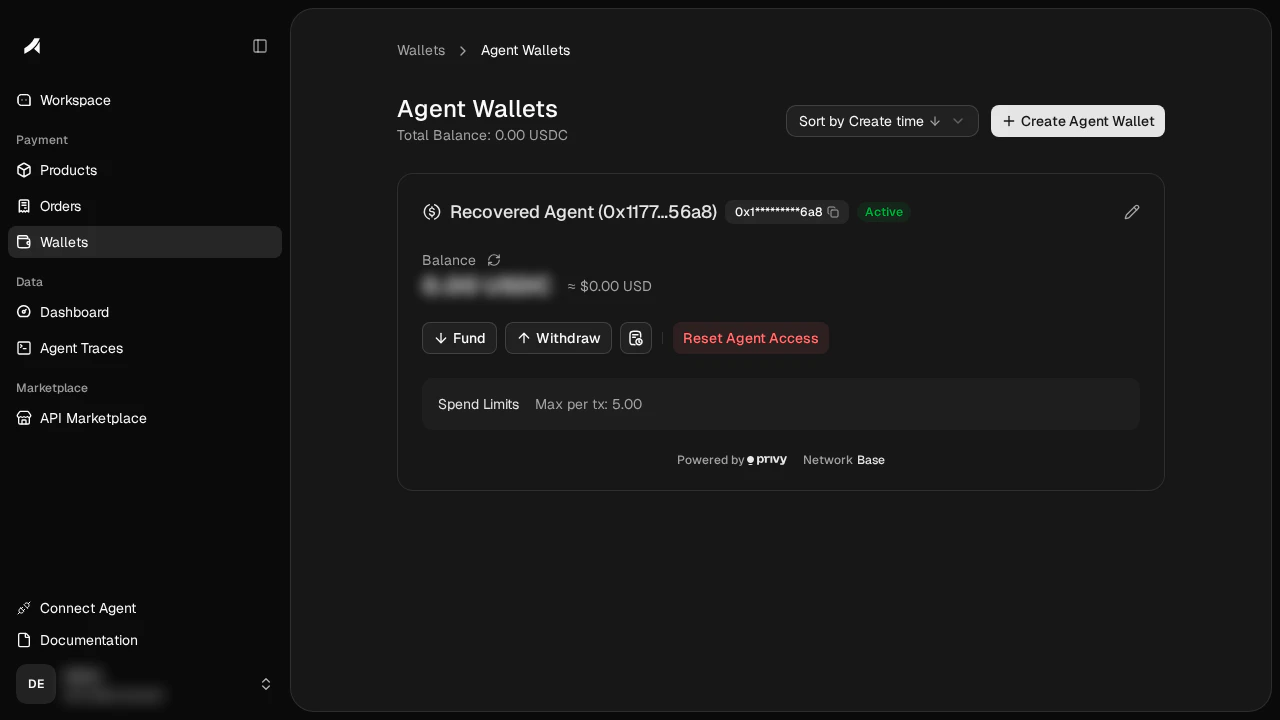 * **↓ Fund / ↑ Withdraw** — transfer USDC between main wallet and agent wallet
* **Edit** (pencil icon) — update the spending limit
* **Reset Agent Access** — rotate the signing key (wallet address + balance preserved)
```bash theme={null}
# List all agent wallets
anyway wallets agents list
# View activity log
anyway wallets agents history [--limit 50]
# View spending policies
anyway wallets agents policies
# Check agent identity
anyway wallets agents whoami
# Check org-level Anyway Credits used before wallet USDC for SuperAPI/x402
anyway wallets agents credit-balance
# Switch default agent (alias: `use`)
anyway wallets agents default
# Rotate signing key
anyway wallets agents reset
# Headless / agent: non-blocking begin → continue → restart (same as create)
anyway wallets agents reset --non-interactive # begin: prints URL, exits
anyway wallets agents reset --non-interactive --continue # resume, wait ~60s for approval
```
Reset keeps the same `agentId` and wallet address. Both interactive and non-interactive reset verify the refreshed key and replace the stale local key automatically on approval — no bundle to copy (`--non-interactive` runs the same begin / continue / restart device flow as create). Only if you rotate the key **outside the CLI** — from the dashboard, or a browser callback that couldn't reach the CLI — copy the revealed bundle and run `anyway wallets agents import --token `, then verify with `anyway wallets agents whoami `. You do not need to `forget` the old local record first.
See the [CLI reference](/sdk/cli#wallets-agents) for the full list of agent-wallet subcommands and their auth requirements.
## How It Works
```
Agent → sign with P-256 key → Privy MPC signs USDC transfer → x402 payment settles on Base
```
When the agent makes a payment:
1. The agent builds an [EIP-712](https://eips.ethereum.org/EIPS/eip-712) typed data payload (USDC `TransferWithAuthorization`)
2. It signs a request to Anyway's backend using its **P-256 key** — this proves identity
3. Anyway forwards the request to **Privy**, which checks the spending policy
4. If the policy allows it, Privy's MPC wallet produces a **secp256k1 signature** — this authorizes the USDC transfer
5. The agent sends this signature to the SuperAPI via the [x402 protocol](https://x402.org), and the payment settles on Base
The agent never holds the wallet's private key. It only holds a P-256 signing key that authorizes Privy to sign on its behalf, within the limits you set.
### Zero Custody
| Key | Where it lives | Who can access it |
| ----------------------------- | ----------------------------------------------------------- | ---------------------------------------------- |
| **Wallet key** (secp256k1) | Privy embedded wallet — created client-side in your browser | Privy MPC (no single party holds the full key) |
| **Agent signing key** (P-256) | Agent's local machine or runtime | Only the agent |
Anyway never sees or stores either key.
### Spending Policies
Policies are enforced by Privy at the MPC signing layer — not by Anyway's backend. This means even if the backend is compromised, the agent cannot spend beyond its limits.
Default rules on every new agent wallet:
* **Max per transaction** (\$5 by default) — caps each x402 payment
* **Block direct sends** — the agent can only pay through x402, not transfer USDC freely on-chain
* **↓ Fund / ↑ Withdraw** — transfer USDC between main wallet and agent wallet
* **Edit** (pencil icon) — update the spending limit
* **Reset Agent Access** — rotate the signing key (wallet address + balance preserved)
```bash theme={null}
# List all agent wallets
anyway wallets agents list
# View activity log
anyway wallets agents history [--limit 50]
# View spending policies
anyway wallets agents policies
# Check agent identity
anyway wallets agents whoami
# Check org-level Anyway Credits used before wallet USDC for SuperAPI/x402
anyway wallets agents credit-balance
# Switch default agent (alias: `use`)
anyway wallets agents default
# Rotate signing key
anyway wallets agents reset
# Headless / agent: non-blocking begin → continue → restart (same as create)
anyway wallets agents reset --non-interactive # begin: prints URL, exits
anyway wallets agents reset --non-interactive --continue # resume, wait ~60s for approval
```
Reset keeps the same `agentId` and wallet address. Both interactive and non-interactive reset verify the refreshed key and replace the stale local key automatically on approval — no bundle to copy (`--non-interactive` runs the same begin / continue / restart device flow as create). Only if you rotate the key **outside the CLI** — from the dashboard, or a browser callback that couldn't reach the CLI — copy the revealed bundle and run `anyway wallets agents import --token `, then verify with `anyway wallets agents whoami `. You do not need to `forget` the old local record first.
See the [CLI reference](/sdk/cli#wallets-agents) for the full list of agent-wallet subcommands and their auth requirements.
## How It Works
```
Agent → sign with P-256 key → Privy MPC signs USDC transfer → x402 payment settles on Base
```
When the agent makes a payment:
1. The agent builds an [EIP-712](https://eips.ethereum.org/EIPS/eip-712) typed data payload (USDC `TransferWithAuthorization`)
2. It signs a request to Anyway's backend using its **P-256 key** — this proves identity
3. Anyway forwards the request to **Privy**, which checks the spending policy
4. If the policy allows it, Privy's MPC wallet produces a **secp256k1 signature** — this authorizes the USDC transfer
5. The agent sends this signature to the SuperAPI via the [x402 protocol](https://x402.org), and the payment settles on Base
The agent never holds the wallet's private key. It only holds a P-256 signing key that authorizes Privy to sign on its behalf, within the limits you set.
### Zero Custody
| Key | Where it lives | Who can access it |
| ----------------------------- | ----------------------------------------------------------- | ---------------------------------------------- |
| **Wallet key** (secp256k1) | Privy embedded wallet — created client-side in your browser | Privy MPC (no single party holds the full key) |
| **Agent signing key** (P-256) | Agent's local machine or runtime | Only the agent |
Anyway never sees or stores either key.
### Spending Policies
Policies are enforced by Privy at the MPC signing layer — not by Anyway's backend. This means even if the backend is compromised, the agent cannot spend beyond its limits.
Default rules on every new agent wallet:
* **Max per transaction** (\$5 by default) — caps each x402 payment
* **Block direct sends** — the agent can only pay through x402, not transfer USDC freely on-chain